Exchange Online Adds Archive Mail API Support and Default Folder Permission Controls
Graph Mail API can now access Online Archives, while a tenant wide Exchange Online setting blocks new permissions for the Default principal.
Exchange Online administrators have two changes to account for: Microsoft Graph’s Mail API can now work with Online Archive mailboxes, and a new organization setting can block permissions granted to the Default folder principal. The first helps close a gap left by EWS deprecation; the second gives tenants a broad control over folder sharing, with effects on both administrators and end users.
Graph Mail API reaches Online Archive folders
The Mail API support announced this week allows applications to list folders and access items stored in users’ Online Archives, including auto expanding archives. This is separate from the Mailbox Import and Export APIs, which already supported archive operations. Both API families can use delegated or application permissions, though their permission scopes differ.
The Mail API uses paths such as /users/{userId}/mailFolders. Mailbox Import and Export calls use the admin endpoint, including /admin/exchange/mailboxes/{id}/folders. For archive access through the Mail API, first identify the archive mailbox object, then use its ID as the user identifier in subsequent Graph requests.
# Get the set of mailboxes for the user
GET https://graph.microsoft.com/beta/users/{userId}/settings/exchange

# List folders in the user's Online Archive
GET https://graph.microsoft.com/beta/users/{inPlaceArchiveMailboxId}/mailFolders?$top=99&$select=displayName
The archive ID comes from the inPlaceArchiveMailboxId value returned by the mailbox query. It works directly in the /users/{...} path; there is no separate mailbox path. The value combines the MBX: prefix, the archive mailbox GUID, an at sign and the tenant ID. Exchange Online PowerShell can produce the same format:
$m = Get-MailboxLocation -User vasil
"MBX:{0}@{1}" -f ($m | ? {$_.MailboxLocationType -eq "MainArchive"}).MailboxGuid,$m[0].TenantGuid
MBX:2752e945-1dfb-4c09-ae52-895a426dc120@923712ba-352a-4eda-bece-09d0684d0cfb
The same approach applies to the primary mailbox and AUX archives. The mailbox lookup requires User.Read.All; the Mail API query needs at least Mail.ReadBasic. With delegated access, users can reach only their own archive. Applications can use app permissions for scenarios that require broader access.
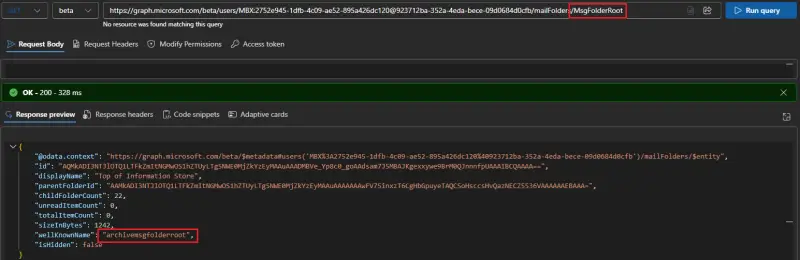
There’s a notable limitation around well known folder IDs: most can’t be used against the archive. MsgFolderRoot does work, however, and provides a route to the archive root and its child folders. The resulting parent folder ID can help enumerate folders, including the Recoverable Items subtree.
# Get the MsgFolderRoot of the Online Archive
GET https://graph.microsoft.com/beta/users/{inPlaceArchiveMailboxId}/mailFolders/MsgFolderRoot

# List top-level folders under the archive root
GET https://graph.microsoft.com/beta/users/{inPlaceArchiveMailboxId}/mailFolders/{parentFolderId}/childFolders?$top=99

# List subfolders under the Recoverable Items root
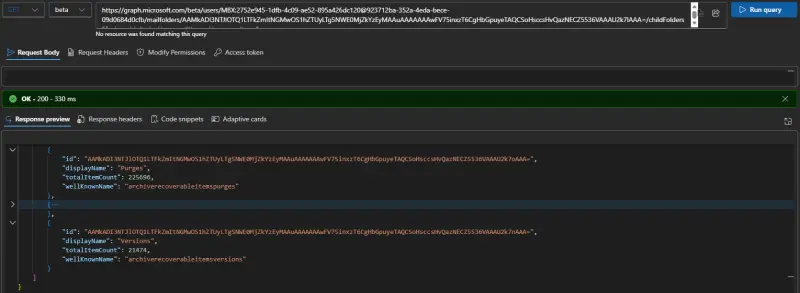
GET https://graph.microsoft.com/beta/users/{inPlaceArchiveMailboxId}/mailFolders/{ArchiveRecoverableItemsRootId}/childFolders?$select=id,displayName,wellKnownName,totalItemCount
Only immediate child folders appear in each folder query, so applications may need to make additional requests to build a full folder tree. Although Microsoft’s documentation describes access to the non-IPM subtree, access under ApplicationDataRoot remains largely unavailable. The Recoverable Items subtree is accessible after finding the ID for archiverecoverableitemsroot.

That access enables queries against folders such as Purges. For example, a request can retrieve a small page of messages from the Online Archive’s Recoverable Items Purges folder:
# List a subset of messages in the archive's Purges folder
GET https://graph.microsoft.com/beta/users/{inPlaceArchiveMailboxId}/mailfolders/{ArchiveRecoverableItemsPurgesId}/messages?$top=10
Performance issues have been observed, which may be related to the feature’s preview status. Keep page sizes small and request only the properties the application needs. Microsoft’s [Graph archive mailbox documentation](https://learn.microsoft.com/en-us/graph/archive-mailbox-mail-api) describes the supported API, while its [Recoverable Items guidance](https://learn.microsoft.com/en-us/graph/work-with-archive-mailboxes#find-the-recoverable-items-root) covers locating that subtree.
Tenant wide control for Default folder permissions
The second change targets the Default security principal in mailbox folder permissions. Permissions assigned to Default apply broadly to recognized internal Exchange Online recipients. A common use is read only access to a shared calendar across a tenant; another is granting FolderVisible on a shared mailbox’s root folder so delegates can reach its individual shared folders.

That breadth can create unwanted access. The new DefaultFolderPermissionRestricted parameter for Set-OrganizationConfig lets an organization prevent new permissions from being assigned to Default, except for the None level. The setting is tenant wide and affects administrators as well as end users, so enabling it can change how teams manage shared folders across the organization.
Its default value is False. Set it to True to block permission grants to Default, and check the active value with Get-OrganizationConfig:
# Block permissions for the Default principal
Set-OrganizationConfig -DefaultFolderPermissionRestricted $true

# Check the current setting
Get-OrganizationConfig | select DefaultFolderPermissionRestricted

# Restore permission grants to the Default principal
Set-OrganizationConfig -DefaultFolderPermissionRestricted $false
Changes need time to replicate. After that, attempts to grant a permission to Default through Set-MailboxFolderPermission fail, including when the command is run by a Global Administrator. The error returned by Exchange Online is: “This operation is blocked by the organization’s Default folder permission restriction policy.” Setting the permission to None remains possible, as do permission changes for other principals.
The restriction also applies in Outlook clients. Classic Outlook reports, “The modified permissions cannot be saved”. Outlook on the web and the new Outlook say, “Permissions can’t be saved for the folder {FolderName}”. That behavior gives administrators a consistent block across the management surfaces, though the client messages provide less detail than the PowerShell error.
Existing entries aren’t changed when the control is enabled; it applies to new permission operations. Tenants considering the setting should first inventory existing Default entries and decide how to handle them. The feature does not block permissions for individual users or groups. Microsoft’s [Set-OrganizationConfig documentation](https://learn.microsoft.com/en-us/powershell/module/exchangepowershell/set-organizationconfig?view=exchange-ps#-defaultfolderpermissionrestricted) has parameter details.
Two other recent additions to Set-OrganizationConfig are also visible: EnforceExoAppRbacPermissions and AutomaticForcedReadReceiptEnabled. Their documentation remains limited, so administrators should review the available guidance before relying on them. For now, the practical checks are clear: test archive queries with the permissions and folder traversal your application needs, and review current Default folder grants before enabling the tenant wide restriction.