VCF Automation 9.1 Orchestrator 503: Check the vco Persistent Volume
A full vco volume can keep VCF Operations Orchestrator 9.1.1 from starting. Check the install-rpms log and PVC capacity before troubleshooting the database.
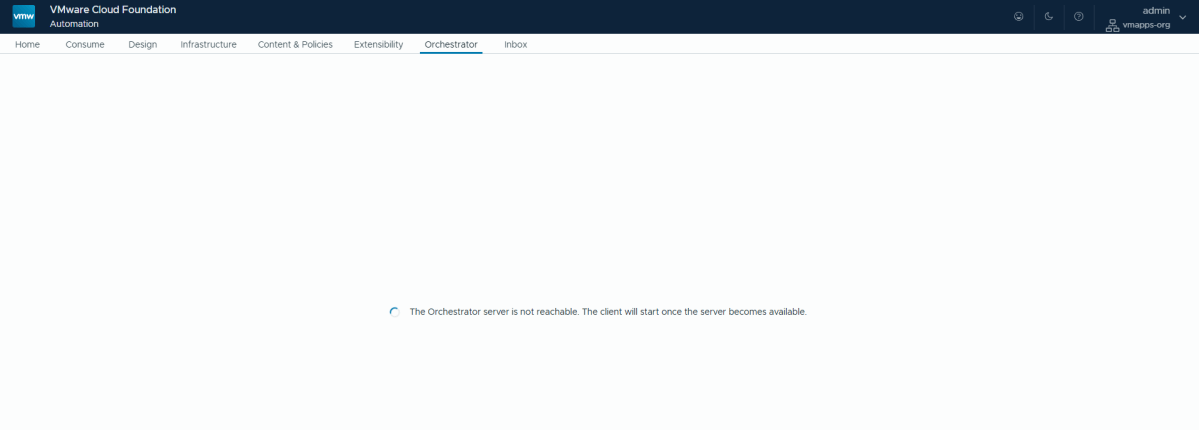
Start with the vco volume when Orchestrator returns 503
When the Orchestrator tab in VCF Automation 9.1 stalled after an appliance restart, the rest of the appliance appeared healthy. The clue was in the Orchestrator startup log: its package installation needed more free space on the vco persistent volume. The appliance’s root disk had room, but that wasn’t the filesystem Orchestrator used.
This case involved a single-node VCF Automation 9.1 appliance with embedded VCF Operations Orchestrator 9.1.1, build 25643527. The Orchestrator API version was 9.1.0.0, the container image was prelude/vco:9.1.1.0100.25757808, and pod vco-app-0 ran as a StatefulSet in the prelude namespace. Its PVC, vco-vol-vco-app-0, was 5 GiB and used the vmsp-default vSphere CSI storage class.
Confirm the failure is isolated to Orchestrator
The VCF Automation interface displayed “The Orchestrator server is not reachable. The client will start once the server becomes available.” Direct API checks narrowed the problem down: GET /iaas/api/about returned 200 and authentication worked, while requests under /vco/api returned HTTP 503.
upstream connect error or disconnect/reset before headers.
reset reason: remote connection failure
That response came from Envoy, the ingress in front of VCF Automation services. The request reached the appliance, but the vco route had no available service behind it. Check the pod before investigating the database or the interface.
Inspect the pod after the appliance restart
Connect to the appliance as vmware-system-user, then switch to root. The commands below need the root shell.

ssh vmware-system-user@<vcfa-appliance-fqdn-or-ip>
sudo -i
kubectl -n prelude get pods
In this lab, the other pods had returned to Running after the appliance restart, but Orchestrator had not:
vco-app-0 0/2 Unknown 2 50dUnknown meant the kubelet had lost track of the pod during the restart. It wasn’t progressing through a startup attempt, so waiting wasn’t likely to help. After deleting it, the StatefulSet controller could recreate it.
Check the controller type first. The pod name ending in -0 is a useful hint, and this command confirms it:
kubectl -n prelude get statefulset | grep vcoThe lab showed vco-app 0/1. A Deployment named vco-app didn’t exist, so attempting to scale one returned NotFound. For this stuck pod, the author used a force delete and watched the replacement start:

kubectl -n prelude delete pod vco-app-0 --force --grace-period=0
kubectl -n prelude get pod vco-app-0 -w
The replacement repeatedly reached Init:2/3, then failed and entered CrashLoopBackOff. That was progress: Kubernetes was starting the pod again, but its third init container couldn’t complete.
Read the first error in install-rpms
The three init containers were vco-dependencies, external-cert and install-rpms. The failing container installs the Orchestrator server packages under /usr/lib/vco, which resides on the persistent volume. Its log exposed the cause:
kubectl -n prelude logs vco-app-0 -c install-rpms --tail=100The first significant error said the vco-server package needed 204MB more space on the /usr/lib/vco filesystem. Later messages included a failed keystore password check and a missing vro-configure-inner.sh script, followed by “Unable to configure database.” Those later failures followed the incomplete package installation: the required files hadn’t been installed.
The log also showed CONFIGURED=true, indicating that the volume still held a configured Orchestrator. The init process reinstalls packages on startup, and an RPM upgrade needs enough room for the package transaction. Read the log from the top so that secondary errors don’t distract from the first failure.

Check the PVC, not the appliance root disk
A check of the appliance’s / filesystem showed 68% use on a 93 GB disk. That looked healthy, but it didn’t measure the space available to Orchestrator. The PVC and filesystem checks pointed to the right storage:
kubectl -n prelude get pvc vco-vol-vco-app-0
kubectl get sc
df -h | grep pvc-f642a71d
The claim was Bound at 5Gi, and the mounted filesystem showed 4.5G used with 459M free: 91% full. Its storage class used the csi.vsphere.vmware.com provisioner, and allowed volume expansion. In the appliance, the volume appeared as /dev/sdw.
Expand the claim and let the pod remount it
In the lab, the PVC request was increased to 10Gi:
kubectl -n prelude patch pvc vco-vol-vco-app-0 -p '{"spec":{"resources":{"requests":{"storage":"10Gi"}}}}'
kubectl -n prelude get pvc vco-vol-vco-app-0 -w
The claim initially continued to show 5Gi, then reported 10Gi. The vSphere CSI driver resized the virtual disk and filesystem when the volume was remounted. The author didn’t change the VM disk through vCenter: manually resizing a CSI-managed disk can leave its reported size out of sync with Kubernetes. The datastore needs a few GB of free capacity. To inspect the container volume in vCenter, the path given was Cluster > Monitor > Cloud Native Storage > Container Volumes.
After the claim showed the new capacity, the pod was deleted again and monitored:
kubectl -n prelude delete pod vco-app-0
watch -n 5 'kubectl -n prelude get pod vco-app-0; echo; df -h | grep pvc-f642a71d'
The filesystem then reported 10G total, 4.4G used and 5.6G free. The pod reached Running with zero restarts. It temporarily showed 1/2 containers ready; the Orchestrator server was still starting after the package installation. The server log marked completion with “VCF Operations orchestrator Server started.” A check of /vco/api/about returned 200 with version 9.1.1.0.25643527, and the workflows and tags were present. They were stored in the vco_db database on vcfapostgres, rather than on the expanded volume. The Orchestrator tab loaded again.
Account for VCF Operations lifecycle tracking
Patching a PVC is a Kubernetes method for expanding a claim, but the described approach wasn’t a documented VCF Automation procedure. Broadcom KB 425145 covers a similar install-rpms space failure during an upgrade from 9.0.0 to 9.0.1. Its remedy is to clear the usr/lib/vco directory on the volume so the packages can be installed again.
For version 9.1, VCF Operations includes an increase storage size action at Build > Lifecycle > VCF Management > Components > Actions > Increase Storage Size. Using that action keeps Fleet Lifecycle aware of the revised capacity. KB 442600 describes a known issue in which the displayed size becomes 0 and later resize attempts fail with “Unsupported unit”; it includes a fix script.
If you expand the PVC with kubectl, run Sync on the Components page in VCF Operations afterwards and check the storage size shown for VCF Automation. That keeps the lifecycle view aligned with the claim before a later upgrade. For a customer environment, the KB procedure, the VCF Operations action or a support case are the safer starting points. When the Orchestrator route returns 503, the most useful next check is the first error in the install-rpms log, followed by the capacity of the vco PVC.


