Microsoft Entra Tenant Governance Adds Expiring Relationships and Cross-Tenant Monitoring
Tenant Governance adds relationship expiry, tenant switching and cross-tenant configuration deployments, with licensing and permission limits to check.
Microsoft Entra Tenant Governance is adding controls that affect how teams manage partner tenants, apply configuration baselines and move between directories. The changes include time-limited governance relationships, a tenant switcher in the Entra Admin Center and an initial cross-tenant monitoring and deployment experience. For administrators, the practical work is to check relationship lifetimes, delegated permissions, eligible user roles and licensing before relying on the new features.
Set a lifetime for governance relationships
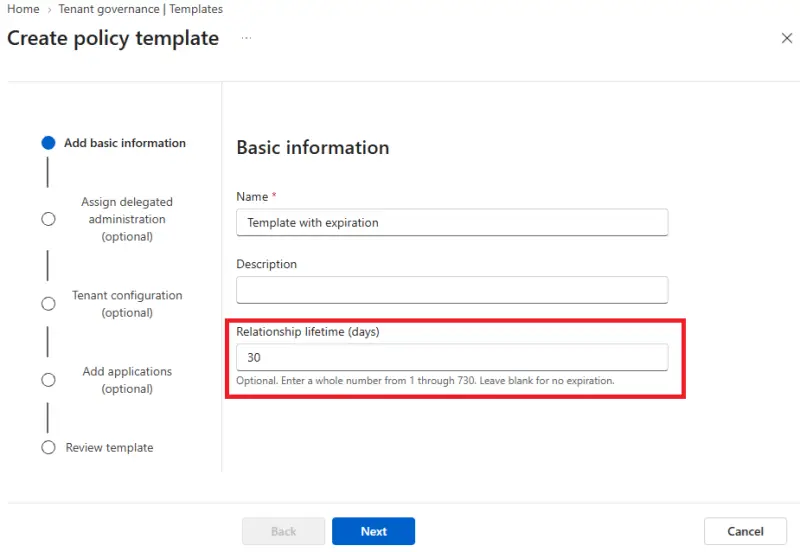
Governance policy templates can now set how long a relationship lasts, with values from 1 to 730 days. This suits arrangements where a tenant needs a baseline applied and monitored for a defined period, then access should end unless both sides agree to continue.

The setting is part of the policy template workflow. That has a consequence for existing relationships: changing their lifetime requires a new request through the updated template, followed by the associated approvals. The underlying Microsoft Graph beta property is relationshipLifetimeInDays on the governancePolicyTemplate object. For example, a request can set the value to 365:
PATCH "https://graph.microsoft.com/beta/directory/tenantGovernance/governancePolicyTemplates/default"
{
"relationshipLifetimeInDays": 365
}
There is a current limitation to account for: after a lifetime has been set, neither the interface nor the API can remove it. Microsoft is expected to address this, but administrators should plan around the restriction until that change is available.
Both governed and governing tenant lists now include an Expiration date. The interface highlights relationships due to expire within 30 days. A governing tenant can request renewal; if the governed tenant accepts, the relationship’s lifetime is extended using the configured duration, counted from the acceptance date. If the request is not accepted, the relationship ends.
Tenants can govern and be governed
A tenant can now participate on either side of a governance relationship, including both roles at once. Bidirectional relationships are also supported. This lets teams create more flexible arrangements between tenants, but governance does not flow transitively: each tenant pair needs its own relationship, in one or both directions.
For example, Contoso and Fabrikam can establish a relationship in either direction or both. Fabrikam can separately establish a relationship with TailSpin Toys. The relationship between Fabrikam and TailSpin Toys does not inherit or depend on the Contoso relationship; the change is that these layered arrangements are now permitted. Microsoft’s guidance on multi-tier governance describes the setup.
Switch to tenants your account can access
The Entra Admin Center now has a tenant switcher for governed tenants. From the Overview page, choose Manage Tenants, open Governed tenants, and select a directory or use Switch. After the page reloads, the interface operates in that tenant’s context, subject to the permissions assigned to your account. To return, use View home tenant from the same area.


The list is limited to tenants the signed-in user is authorized to access. Only active roles count; expired or terminated relationships do not qualify. The switcher also shows only directly governed tenants, not tenants reachable through a multi-tier relationship. The account details shown when hovering over the profile picture reflect the GDAP access model.
Microsoft Graph beta also adds GET /me/accessibleTenants to list governed tenants available to the current user. The method requires User.Read and can only be run for your own user, even though a /users/{id} endpoint form is also supported. Tenants returned by the request should be available through the Entra Admin Center switcher and the similar control in the Microsoft 365 Admin Center.
# List governed tenants you can access
GET https://graph.microsoft.com/beta/me/accessibleTenants

Configuration templates and deployments get interface support
Configuration templates now appear under Tenant Governance > Templates > Configuration templates. Administrators can browse, filter, add and remove templates. The interface exposes only the latest version; editing a template in its basic JSON editor creates a new version.

When setting up monitors, administrators can select a configuration template as the baseline. “Apply once” monitors, also called configuration deployments, now have a page under Tenant Governance > Configuration deployments. The Deploy configuration wizard can use a template as its baseline, and selecting a deployment opens a detail view modeled on monitor details.


For now, deployments offer the only Tenant Governance interface described here that can perform a write operation against a tenant; a remediation control is not yet available. A separate permissions page, Tenant Governance > Configuration management permissions, lets administrators assign delegated permissions directly to the TCM service principal in their tenant. Remediation and apply-once monitors depend on these permissions. They can also be configured while creating or modifying policy templates.
Cross-tenant monitoring has limits
The first cross-tenant monitoring and configuration deployment options are available under Tenant Governance > Other tenants. The Monitors and Configuration deployments pages resemble their single-tenant counterparts and include a Target tenant field. The setup wizard begins with tenant selection.

Cross-tenant access is configured through governance policy templates as part of establishing the relationship. Permissions assigned on the local Configuration management permissions page are not automatically transferred to governed tenants. The user creating a cross-tenant monitor or deployment must also belong to the security group specified in the template.
Drift remediation is not included in the cross-tenant experience yet, and the set of supported resources remains limited. Cross-tenant use also requires the product’s Premium tier: Entra ID Governance or Entra Suite licences. Teams evaluating the feature should confirm their licence, template permissions, group membership and target resource support before building it into operating procedures.
Two further capabilities to watch
Microsoft is also previewing a Secure tenant creation API for programmatically provisioning an Entra ID tenant. The new tenant is brought under governance immediately, making Tenant Governance features available from the start.
Another capability, Entra resource policy, evaluates Graph API requests at runtime and can modify a request payload or block the request. Together, these additions point toward more automation across tenant setup and administration. For current deployments, the immediate checks are relationship expiry behavior, direct access eligibility and the permissions and licence requirements for cross-tenant work.


