Microsoft 365 Multi-Tenant Management: Agent Controls, Baselines and Audit Gaps
Microsoft’s preview brings agent management and Copilot baselines into one admin center, with per-tenant remediation and notable automation and audit limits.
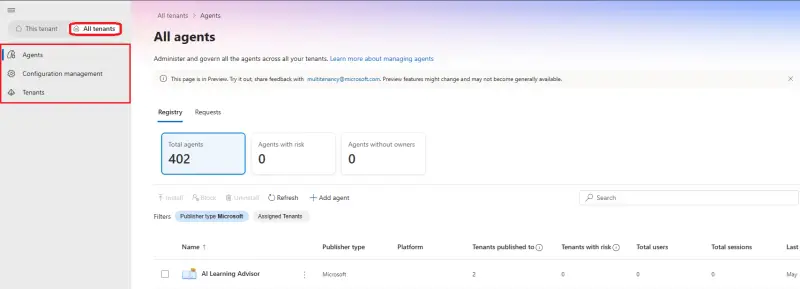
Microsoft’s preview of Multi-tenant Management for Agent 365, Copilot and Microsoft 365 brings cross-tenant agent controls and configuration baselines into the Microsoft 365 Admin Center. For administrators overseeing several tenants, that could reduce the need to move between management portals. The practical limits are just as significant: the feature is still in preview, covers a narrow set of settings, and runs its operations in the signed-in user’s context.
The feature draws on capabilities associated with Microsoft 365 Lighthouse and Tenant Governance. It gives administrators a shared view across managed tenants, while the setup work—bringing tenants under management and granting permissions—happens outside the main admin center experience. For most customers, the setup described here relies on a Tenant Governance relationship. Microsoft’s documentation covers the setup details.
Multi-tenant management has long been a familiar need for service providers and organizations with several Microsoft 365 tenants. Third-party tools have offered reporting, administration, migration, governance and automation for years. Microsoft’s native options may appeal to teams that prefer built-in tooling, including where cost or the security and compliance review of another product matters. The available capabilities still vary: Microsoft 365 Lighthouse has limitations, and its related API remains on the beta endpoint rather than reaching v1.0. Tenant Governance and Tenant Configuration Management offer a broader set of capabilities and may shape how Microsoft develops this experience.
One admin center, several tenant views
In the Microsoft 365 Admin Center, the navigation pane’s tenant selector offers This tenant and All tenants. The first opens the familiar single-tenant administration areas, such as Users, Teams & Groups and Settings. Choose All tenants to open the cross-tenant views.

A separate Tenant switcher at the top right lets eligible administrators work in the context of one selected tenant. That control has been extended to support governance relationships, but it remains a single-tenant experience. The broader cross-tenant management pages are under All tenants.
The current preview groups its functions into agent management, configuration management and tenant status. Cost management was mentioned in Microsoft’s product update, but it is not available in the experience described here. Microsoft has separately exposed spending policies through an API, which has been examined in this analysis.
Agent administration across tenants
The Agents view consolidates discovered agents from the governed tenants. Its available filters group entries into Total agents, Agents with risk and Agents without owners, much like the single-tenant view. Administrators can inspect per-tenant details, add agents, manage deployments or block an agent, although the cross-tenant page offers fewer actions and no bulk operations.
Selecting an agent opens a details pane with a tenant-by-tenant breakdown and a search field. The counts at the top summarize the agent across tenants. The Details, Users, Permissions and Activity tabs, along with the actions available, reflect the tenant selected in the pane. Administrators should check that context before making a change.

The Requests view is also supported, but it is limited to 20 tenants at a time. Administrators must add tenants manually with Select tenants. The available decisions are Publish and Reject. The preview does not include multi-tenant versions of the Agent map or Deleted agents pages.
There are no public APIs for managing agents across tenants through this feature. The corresponding agent details and actions are available through the single-tenant Graph API, so organizations could make separate requests for each tenant. A significant constraint is the lack of application permissions for the relevant operations, which complicates unattended administration.
Baselines cover a limited set of settings
Configuration management is intended to help align settings across tenants. The page offers a default Default Microsoft 365 Copilot And Agent Baseline, plus the option to create narrower baselines using a subset of its settings. The available controls are limited to settings for Copilot and Agent 365 that the Graph API currently supports.


Although the page uses the Configuration management name associated with Tenant Configuration Management, the current implementation relies on Microsoft’s beta multitenant management API, also used by Microsoft 365 Lighthouse. The API is not fully documented. Baselines appear as managementTemplateCollections objects, which can be queried with delegated ManagedTenants.Read.All permission:
GET https://graph.microsoft.com/beta/tenantRelationships/managedTenants/managementTemplateCollections
The response includes other objects for controls supported by Lighthouse baselines. Newly created baselines appear at this endpoint too. Additional requests can retrieve a baseline’s template, its individual steps and a step definition. For example, the following sequence fetches a collection and its template, expands the template’s controls, then requests a control’s definition:
GET https://graph.microsoft.com/beta/tenantRelationships/managedTenants/managementTemplateCollections/xxxxxxxx-xxxx-xxxx-xxxx-xxxxxxxxxxxx?$select=displayName&$expand=managementTemplates($select=id)
GET https://graph.microsoft.com/beta/tenantRelationships/managedTenants/managementTemplates/xxxxxxxx-xxxx-xxxx-xxxx-xxxxxxxxxxxx?$expand=managementTemplateCollections,managementTemplateSteps($expand=acceptedVersion)
GET https://graph.microsoft.com/beta/tenantRelationships/managedTenants/managementTemplateSteps/xxxxxxxx-xxxx-xxxx-xxxx-xxxxxxxxxxxx?$expand=*
Each control includes validation and deployment actions that describe the backend work. For the Allowed agent types control, validation calls the Copilot policy settings Graph API:

This reuse means the preview builds on existing Lighthouse infrastructure, but it also leaves questions about the long-term API direction. Tenant Governance is already part of the setup path. A future move to the Tenant Configuration Management APIs would align the configuration controls with that relationship model, though no such change is established here.
Assigning baselines and correcting drift
The Tenants page lists managed tenants and shows their assigned baseline and detected differences, or “drifts.” Administrators can adjust the displayed columns, but the filtering controls are limited in the preview. Baseline assignment is performed one tenant at a time, and only one baseline can be assigned to each tenant.

To assign a baseline, select a tenant and choose Assign Baseline. In the side panel, select the desired baseline and then select Assign. When the tenant is managed through Microsoft 365 Lighthouse, assigning a baseline here replaces any Lighthouse baselines already configured for it. That interaction is worth checking before using the feature on tenants with existing Lighthouse settings.
The corresponding API operation is a POST to the tenant resource with a baseline ID:
POST https://graph.microsoft.com/beta/tenantRelationships/managedTenants/tenants/Tenant_923712ba-352a-4eda-bece-09d0684d0cfb
{
  "baselineId": "38c5e9a8-8455-4094-baa2-db9b9f90a1f1"
}
Assignment schedules a compliance evaluation. Administrators can also select a tenant and choose Detect drifts to run validation manually. The API call targets the relevant template step versions and supplies the tenant ID and the accepted version IDs for the controls being checked:

POST https://graph.microsoft.com/beta/tenantRelationships/managedTenants/managementTemplateStepVersions/xxxxxxxx-xxxx-xxxx-xxxx-xxxxxxxxxxxx/validate
{
  "tenantId": "923712ba-352a-4eda-bece-09d0684d0cfb",
  "settings": {
    "bulkOperation": {
      "op": "validate",
      "scope": "collection",
      "stepVersionIds": [
        "xxxxxxxx-xxxx-xxxx-xxxx-xxxxxxxxxxxx",
        "xxxxxxxx-xxxx-xxxx-xxxx-xxxxxxxxxxxx",
        "xxxxxxxx-xxxx-xxxx-xxxx-xxxxxxxxxxxx"
      ]
    }
  }
}
For remediation, select the tenant and choose Fix drifts. The resulting panel lists monitored properties and their status. Select one or more drifted values, then choose Fix Drifts to queue the matching deployment actions. The operation runs asynchronously. Leave the panel open to see periodic status updates, or return later to check the results.

Remediation uses delegated permissions in the signed-in user’s context. The API call uses the deploy action and lists the accepted versions of the controls to apply:
POST https://graph.microsoft.com/beta/tenantRelationships/managedTenants/managementTemplateStepVersions/xxxxxxxx-xxxx-xxxx-xxxx-xxxxxxxxxxxx/deploy
{
  "tenantId": "923712ba-352a-4eda-bece-09d0684d0cfb",
  "settings": {
    "bulkOperation": {
      "op": "deploy",
      "scope": "collection",
      "stepVersionIds": [
        "xxxxxxxx-xxxx-xxxx-xxxx-xxxxxxxxxxxx",
        "xxxxxxxx-xxxx-xxxx-xxxx-xxxxxxxxxxxx"
      ]
    }
  }
}
That permission model limits automation: remediation cannot run independently of a signed-in user through application permissions. The Tenants page also lacks a way to unassign a baseline, and most operations have no bulk option. Although multiple detected drifts can be selected for remediation, tenant assignment still requires a separate action for each tenant.
Audit visibility and operational limits
Audit records for actions in this tool are currently available in the Microsoft 365 Lighthouse portal, through its audit view. The Unified Audit Log captures the resulting workload changes for drift remediation, but it does not show events for creating or assigning a baseline. This can make it harder to trace the full sequence from baseline setup through a later configuration change.
The Lighthouse records include the Graph request URL and payload for an operation. In the Unified Audit Log, administrators may see workload events such as UpdatedPolicyConfig for Copilot policy changes. Those changes run through the cloud policy service and use the CPSOperation record type.

The preview packages familiar Lighthouse and Tenant Governance capabilities inside the Microsoft 365 Admin Center, which should make basic cross-tenant tasks easier to find. For now, administrators should account for its narrow Copilot and Agent 365 scope, per-tenant workflow, delegated remediation and split audit trail. Those constraints will determine whether it fits day-to-day operations while Microsoft develops the experience further.


