Microsoft Tenant Configuration Management Adds One-Time Baseline Deployment
The applyOnce mode deploys a configuration baseline through a monitor, but relies on delegated access and leaves gaps in auditing and failed-drift handling.
Tenant Configuration Management (TCM) can now apply a baseline in one pass through the preview’s applyOnce mode. For administrators bringing a newly governed tenant into line, that can reduce the work of creating a monitor and then fixing each detected deviation separately. The trade-off is operational: the process runs with the initiating user’s delegated access, performs remediation asynchronously and leaves some important details out of TCM’s own audit events.
A monitor that applies its baseline once
Microsoft calls this capability applyOnce, configuration deployment or baseline application. It combines monitor-based drift detection with the write capability used to remediate deviations. The baseline describes the intended configuration; when the monitor runs, TCM compares that baseline with the tenant’s current settings and attempts to correct differences.
The operation starts immediately when a monitor is created in applyOnce mode or an existing monitor is switched to that mode. After the run, TCM changes the monitor’s status to inactive. This is a one-time deployment mechanism, not an ongoing enforcement loop. If teams need continued checks against the same resources, they’ll need a separate monitor configured for ongoing monitoring.
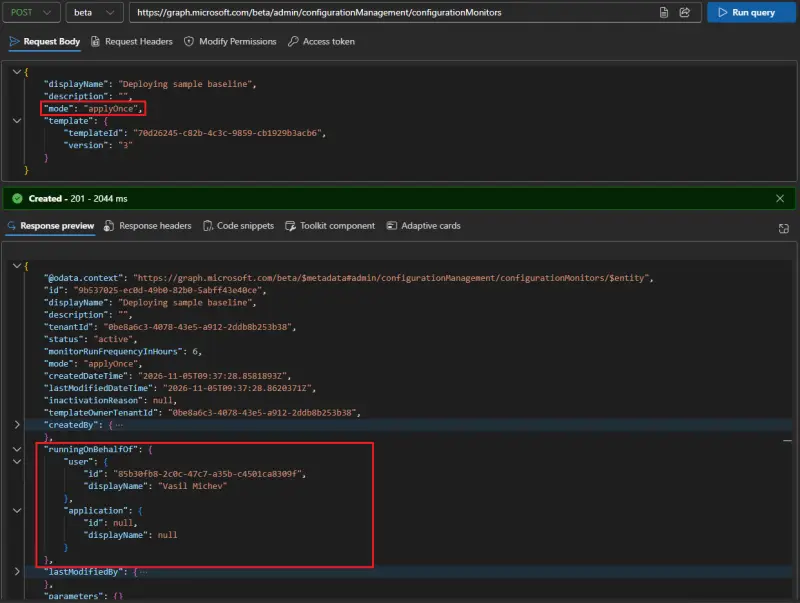
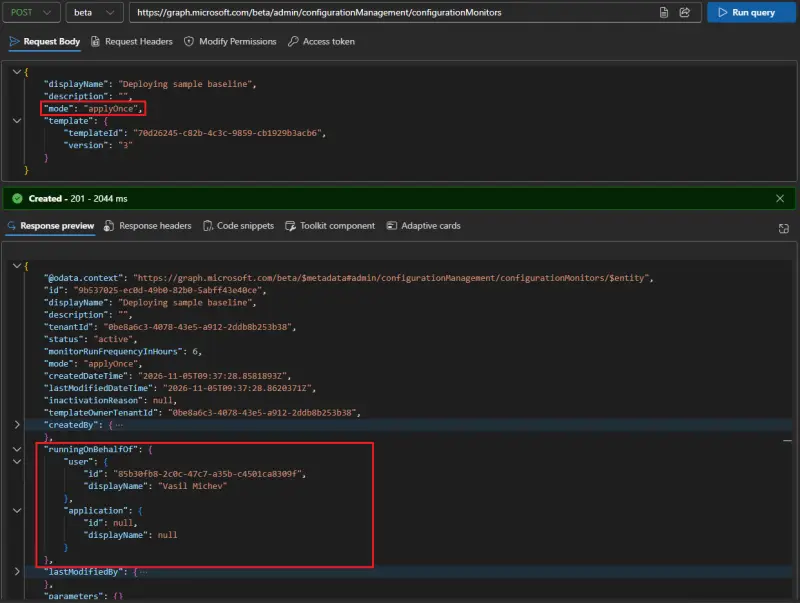
A configuration template can supply the baseline when creating a monitor, or when using a template-based baseline on an existing monitor. That makes a template the reusable configuration source for the deployment. The Graph API request uses the beta /configurationManagement/configurationMonitors endpoint and sets mode to applyOnce:
POST https://graph.microsoft.com/beta/admin/configurationManagement/configurationMonitors
{
  "displayName": "Deploying sample baseline",
  "description": "",
  "mode": "applyOnce",
  "template": {
    "templateId": "xxxxxxxx-xxxx-xxxx-xxxx-xxxxxxxxxxxx",
    "version": "3"
  }
}
In the example, the template version is 3. A successful creation returns 201 Created. The response also identifies the caller as the actor running the monitor, rather than TCM’s service principal. That distinction matters when reviewing access and audit records: the initiating user’s identity and permissions are part of the execution path.
Delegated access shapes deployment
The current implementation supports delegated permissions for remediation and configuration deployment. To create the monitor, the initiating account needs an admin role and the ConfigurationMonitoring.ReadWrite.All scope. To apply the baseline, that user also needs an admin role covering the resources being changed. The corresponding delegated permissions must already be granted to TCM’s service principal.

One user access token exchange is not enough for a baseline spanning multiple resources and workloads. Instead, the user’s access token is cached for a limited time and reused as needed while the deployment runs. The implementation therefore depends on delegated access across an asynchronous operation. Administrators should account for that design when deciding who can start deployments, which workloads a template covers and how long-lived or automated workflows will operate.
This dependency also limits unattended automation. Where a process needs to run without a user’s delegated access, the current permission model may be a blocker. Microsoft’s preview supports write operations through delegated permissions, while read-only scenarios have a different permission model. That leaves teams with less flexibility to automate baseline changes than to inspect configuration.
Track the run and handle failures
TCM records the immediate run on a configurationMonitoringResults object. Administrators can check runInitiationDateTime to see when execution began and runType to confirm that the run was an apply. The run generates configurationDrifts objects for differences from the desired state. Remediation then proceeds asynchronously, so the deployment does not return the per-drift remediation results associated with the /remediate method. Instead, the monitor result reports summary counts in driftsCount and driftsFixed.
When the attempt finishes, TCM sets the monitor to inactive whether or not it successfully changed the configuration. The inactivationReason property explains that the system made the status change after executing in applyOnce mode. Administrators should therefore inspect the run’s results rather than treating an inactive monitor as proof that every setting was corrected.
To retry a deployment—for example, after addressing a permissions problem—an administrator can set the monitor’s status back to active:
PATCH https://graph.microsoft.com/beta/admin/configurationManagement/configurationMonitors/xxxxxxxx-xxxx-xxxx-xxxx-xxxxxxxxxxxx
{
  "status": "active"
}
Reactivating the monitor schedules another run, which will again try to remediate differences from the baseline. Failed attempts can be examined per resource through errorDetails on the parent monitor, or by querying the related drift objects. Those drifts remain active after failure. The described preview does not allow administrators to manually remediate them with /remediate; that request returns 409 Conflict. Microsoft has said this behavior is unintended and is being addressed. Until it changes, teams need to identify and fix the underlying issue before retrying the deployment.
Audit records need workload-level review
Auditing is split between TCM service events and the audit records produced by the affected workloads. TCM events can show who created or updated a monitor, but they currently provide little detail about what configuration was applied. A CreateMonitor event does not identify whether the monitor used applyOnce mode or describe its baseline. An UpdateMonitor event also does not show the values of modified properties.
Workload audit records can fill in some of that picture. For a Conditional Access policy change, for example, the Entra ID Audit log can list updated properties and values, along with initiatedBy and performedBy details. Coverage varies by workload, however, and the baseline may span several workloads with different audit behavior. Administrators investigating a deployment should check the relevant workload logs as well as TCM records, while recognizing that the complete change history may not be present in one place.
That gap has practical consequences if a monitor or its configuration template is later deleted: the remaining records may not show which baseline drove a change or why a property changed. Better audit detail would make it easier to reconstruct deployments across workloads. For now, teams should plan their review around both the monitor run data and the audit logs for each affected service.
What administrators should plan for
Configuration deployment is a monitor object running in applyOnce mode, and it now has a basic user interface page as well as Graph API support. A template can provide its baseline, but the resulting monitor stops after its one-time attempt. Keep a separate monitor if the same resources need ongoing checks.
The preview’s new write capability can help teams apply a prepared baseline across a tenant, but permission requirements, asynchronous completion and uneven audit detail all affect how safely that work can be operated. Before using it at scale, administrators should confirm delegated access for the initiating account and TCM service principal, review per-resource failures after each run, and verify changes in the relevant workload audit logs. Application permissions and broader workload support remain areas to watch as Microsoft develops TCM.


