Entra Resource Policies: Assignments, Parameters and Graph API Reads
Entra resource policy assignments support version pinning and parameters, while privileged reads let policies check Graph data with attention to latency and input validation.
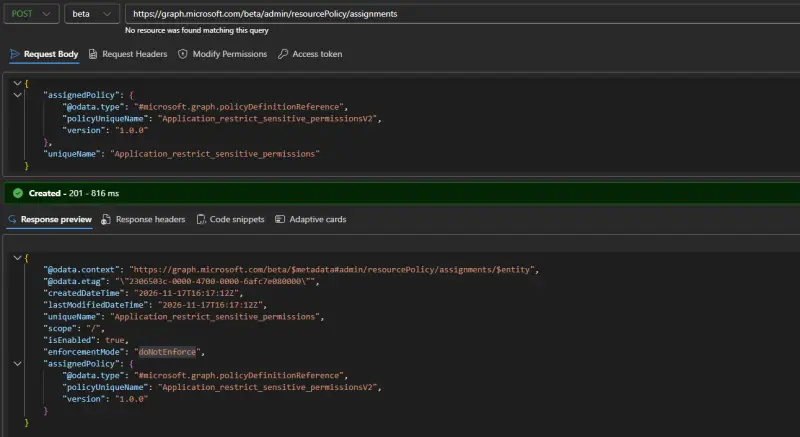
Assignments set the policy version and enforcement behavior
Entra resource policy assignments determine which policy definition applies, which version it uses and how it is enforced. Administrators can manage assignments through Microsoft Graph’s beta resource policy API, using the same general process for built-in and custom definitions.
A basic assignment points to a policy definition and gives the assignment a unique name. If omitted, isEnabled defaults to true, enforcementMode to doNotEnforce, and scope to /. The example below specifies these values explicitly and pins the assignment to version 1.0.0. Creating it requires ResourcePolicyAssignment.ReadWrite.All.

# Create a policy assignment
POST https://graph.microsoft.com/beta/admin/resourcePolicy/assignments
{
  "assignedPolicy": {
    "@odata.type": "#microsoft.graph.policyDefinitionReference",
    "policyUniqueName": "Uniqie_name_for_the_resource_policy_definition",
    "version": "1.0.0"
  },
  "enforcementMode": "enforce",
  "isEnabled": true,
  "scope": "/",
  "uniqueName": "Unique_name_for_the_assignment"
}
If an assignment doesn’t name a version, it uses the latest available version. Pinning a version keeps the assignment on that version’s Rego payload, even after a newer one is released. A policy can have one assignment per version, so multiple assignments can point to different versions of the same policy definition. Microsoft describes the behavior in its resource policy lifecycle documentation.
Graph supports the usual assignment operations: listing assignments, filtering the list, retrieving one by its unique name, changing its properties, and deleting it. Deletion is soft at first; a deleted assignment can be restored or permanently removed through the deleted items endpoint. The PATCH example uses the assignment’s @odata.etag value in an If-Match header before disabling it.
# List assignments
GET https://graph.microsoft.com/beta/admin/resourcePolicy/assignments

# List enabled assignments
GET https://graph.microsoft.com/beta/admin/resourcePolicy/assignments?$filter=isEnabled eq true

# Retrieve one assignment
GET https://graph.microsoft.com/beta/admin/resourcePolicy/assignments/{uniqueName}

# Soft-delete an assignment
DELETE https://graph.microsoft.com/beta/admin/resourcePolicy/assignments/{uniqueName}

# Restore a soft-deleted assignment
POST https://graph.microsoft.com/beta/admin/resourcePolicy/deletedItems/assignments/{uniqueName}/restore

# Permanently delete a soft-deleted assignment
DELETE https://graph.microsoft.com/beta/admin/resourcePolicy/deletedItems/assignments/{uniqueName}

# Disable an active assignment
PATCH https://graph.microsoft.com/beta/admin/resourcePolicy/assignments/{uniqueName}
If-Match: "@odata.etag value"
{
  "isEnabled": false
}
See Microsoft’s resourcePolicyAssignment documentation for more API details. In practice, version selection and enforcement mode deserve attention before creating an assignment: they establish which policy logic runs and whether the assignment is configured to enforce it.
Parameters make assignment values configurable
A policy can define parameters rather than fixing every value in its Rego logic. Administrators supply parameter values when creating the assignment. This can make it easier to test different settings without publishing a new policy version, though the one-assignment-per-version limit constrains how many configurations can be active for that version.
The parameter schema belongs in the policy’s __metadata__ block. It defines each parameter’s name and data type, with an optional description and default value. For arrays, items specifies the accepted element type: string, integer, number or boolean. The schema also marks required parameters. Microsoft lists naming restrictions in its parameter name guidance.
Within policy logic, values are available through the data object. A policy can refer to a parameter collection by its policy name and version, or import that collection into a shorter variable. Built-in definitions are useful examples of how the mechanism is structured.
For instance, the built-in policy named Block service principal assignments to highly privileged roles defines two array parameters. One contains the Entra ID roles the policy checks; the other lists applications excluded from evaluation. Both parameters are optional, but the role parameter’s default values provide a set of roles for evaluation when an administrator supplies no custom list.
During assignment creation, the interface presents controls suited to each parameter’s type. Array parameters open a pane for entering their values, while string parameters use a text box. Existing default entries appear in the form and can be changed. A required parameter is marked with an asterisk and needs at least one value; leaving it empty causes an error. Optional parameters can be left empty or null.

The Rego example below imports an application exclusion list. It checks the caller’s appid claim against the configured values without regard to letter case. When the caller matches an excluded application, the policy marks that caller as excluded; the applicable rule then excludes the policy from applying to that caller.
# Import assignment values into params
import data.graph.ms_catalog_block_service_principal_highly_privileged_role_assignment["1.0.0"].params as params

# Compare the caller's appId with configured exclusions
caller_excluded if {
  is_string(input.request.authContext.appid)
  input.request.authContext.appid != ""
  some appid in params.client_appid_exclusion_list
  lower(appid) == lower(input.request.authContext.appid)
}

applicable if {
  not caller_excluded
}
Parameter values are included in the assignment request under params. This example supplies a role definition ID to a policy that blocks privileged role assignments to guest users. Non-required parameters can be omitted.

# Create an assignment with a parameter
POST https://graph.microsoft.com/beta/admin/resourcePolicy/assignments
{
  "assignedPolicy": {
    "@odata.type": "#microsoft.graph.policyDefinitionReference",
    "policyUniqueName": "ms_catalog_block_privileged_role_assignments_to_guest_users",
    "version": "1.0.0"
  },
  "uniqueName": "Block_privileged_role_assignments_to_guest_users",
  "params": {
    "privilegedRoleDefinitionIds": [
      "db506228-d27e-4b7d-95e5-295956d6615f"
    ]
  }
}
Graph checks that supplied values match their declared data types and returns a Bad Request error if a required parameter has no value. That validation doesn’t confirm that a role definition ID is a valid GUID or maps to an actual Entra ID role. A policy that assumes valid input can therefore behave incorrectly if an administrator supplies an unsuitable value.
Parameters are useful when administrators need to change values without editing the policy definition. But they add an input validation responsibility, and the limited reuse available under the assignment model may make hardcoded values simpler for some policies. For example, a fixed list of privileged roles or application permissions can live directly in the rule logic. Either approach still requires a new assignment when the configuration needs to change, so choose based on how the policy will be maintained.
Privileged reads let policy logic inspect Graph data
Resource policies can evaluate the request and caller details exposed through the input object. Those access token claims may not contain every attribute a policy needs. To check a caller’s directory attributes, group membership or manager, a policy can make additional Graph GET requests through fetchAsPolicy(), provided a privileged-read application has been configured.
These requests run with that application’s permissions, so the available reads depend on the permissions granted to it. The function accepts a relative path and query parameters, then returns a response code and data. It supports GET operations only.
One example is preventing an application from receiving a new client secret until it has at least one owner. Resource policies support the addPassword action, but checking ownership requires a read at evaluation time. Microsoft explains the application setup in its privileged-read application documentation.
The function’s syntax and behavior have limited documentation, particularly for input restrictions and response formats. Microsoft advises against using it to retrieve collections, without giving detailed examples for handling those results. The sample below instead uses $expand to request owners with the application and $select to limit returned fields. Smaller responses can help reduce the added latency of policy checks. Microsoft also sets service limits, but a read that runs for matching requests can still affect user experience if it retrieves more data than needed.
This sample is deliberately narrow. It expects the request to identify the application by its object ID, not its client ID, and its error handling is minimal. It illustrates the read pattern, but needs stronger logic and extensive testing before use in a real policy.
package graph.Applications_enforce_owner_for_client_secret_addition["1.0.6"]

__metadata__ := {
  "title": "Block adding client secrets to ownerless applications",
  "description": "Block the addition of new client secrets unless the application has an owner assigned",
  "selector": {
    "resourceName": "microsoft.graph.application/microsoft.graph.addPassword",
    "operations": ["invokeAction"]
  }
}

# Fetch the application's owners
owners_check := fetchAsPolicy({
  "relativePathUri": sprintf("/v1.0/applications/%s?$select=id,owners&$expand=owners($select=id)", [
    input.request.uriSegments[0].keys.id,
  ])
})

app_exists if {
  owners_check.code == 200
}

owner_exists if {
  owners_check.code == 200
  count(owners_check.data.owners) > 0
}

privileged_read_app_missing if {
  owners_check.code == 401
  owners_check.data == "fetchAsPolicy: no configured application."
}

violations contains "This policy needs a privileged-read application. Ask your administrator to configure one, then try again." if {
  privileged_read_app_missing
}

violations contains "Unable to find application, check the identifier value." if {
  not app_exists
}

violations contains "This application must have at least one owner assigned before you can add client secrets." if {
  not owner_exists
}

deny := {"result": count(violations) > 0, "reasons": sort(violations)}
The policy builds its request from the application identifier in the incoming request, then checks the returned status and owner count. The query selects the application ID and expands owners while selecting only their IDs. That keeps the response focused on the information needed for the check. The sample does not handle every missing-application case, so teams adapting it need to account for the responses their tenant can return.
fetchAsPolicy() also has practical limits. It cannot pass extra headers, which rules out Graph features that require headers, including advanced query behavior. It also requires exact casing for the function name. Keep reads narrowly scoped, confirm the response handling, and test the policy against the request paths it will evaluate. Those checks matter because an additional read can become part of the processing path for every matching request.
Assignments control the version and enforcement settings; parameters provide configurable inputs; privileged reads add directory context to policy decisions. Together, these options extend what resource policies can evaluate, while making validation, query size and testing central parts of administration.


