VMware Cloud Foundation Security: Seven Layers for Hardening Private Cloud
A seven layer VCF defense plan covers management access, identity, network controls, workload protection, host security and recoverable backups.
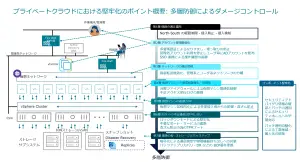
AI assisted vulnerability discovery can shrink the time between disclosure and exploitation, putting pressure on the security routines private cloud teams have relied on. VMware’s guidance frames the response as a set of overlapping controls across the virtual infrastructure: limit access, contain movement between workloads, protect data and keep recovery options out of an attacker’s reach.
Broadcom says its testing with frontier AI models showed how several lower risk flaws can be connected into a serious attack path. The practical implication is that teams can’t assume a vulnerability’s individual severity tells the whole story. The source also describes exploitation timelines moving from weeks to nearly real time, although it does not provide test dates or measured timing data. For administrators, the emphasis shifts toward fast patching and the ability to restrict traffic while remediation is underway.
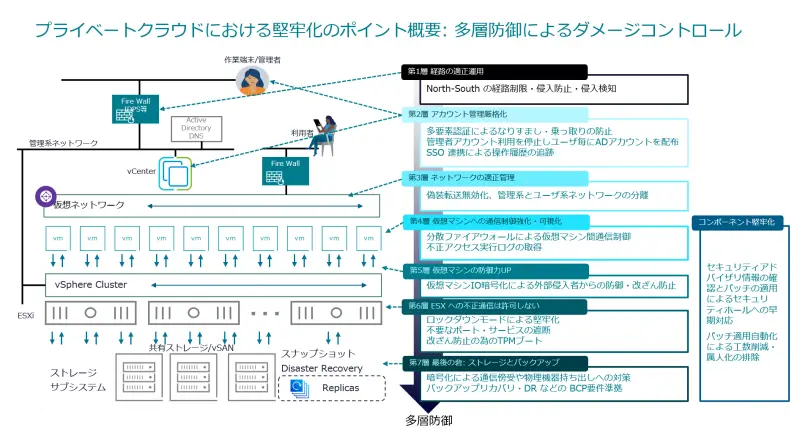
The protected environment has also grown beyond a single on premises network. The article groups security needs into three stages: perimeter controls for a single site; internal monitoring and controls as organizations extend across multiple clouds; and broader defenses for edge systems and private AI infrastructure. The seven layers below focus on controls for VMware vSphere and VMware Cloud Foundation (VCF). They are intended to reduce the impact of a breach as well as block one.
1. Restrict routes into the management plane
Keep vCenter Server and ESX host management interfaces off the public internet. Place management addresses in private network space, and separate administration traffic from virtual machine traffic with a dedicated management VLAN. This limits the chance that a compromised workload can reach the controls used to operate the underlying platform.
Remote administration should pass through a trusted, encrypted route such as a VPN. The guidance calls for prompt VPN security updates, multifactor authentication (MFA), and source IP restrictions where administrator connection addresses are known. These measures address separate weaknesses: unpatched gateways, stolen credentials and connection attempts from unapproved networks.
2. Tighten identity and credential controls
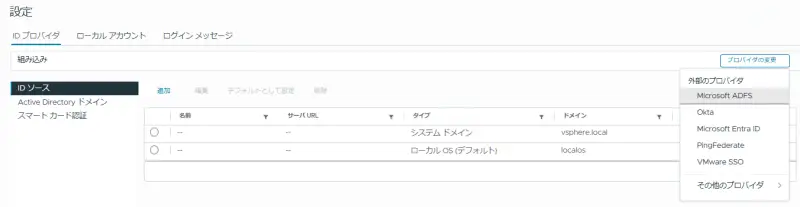
Connect vCenter Server sign in to a directory or identity provider and require MFA. The source names Microsoft AD FS, Okta, Microsoft Entra ID and PingFederate as examples. Avoid routine use of shared administrator accounts such as [email protected]; individual accounts and least privilege make actions easier to trace and limit the damage from a compromised identity.
For VCF 9.1, VMware Cloud Foundation Identity Broker (VIDB) is installed during deployment or upgrade, so it no longer needs to be downloaded separately as a prerequisite for configuring single sign on. The release also expands centralized password and certificate management through VCF Operations. Administrators can define password length, complexity and expiry rules, then assign them across a fleet, to management components or to individual VCF instances.
VCF Operations can also display certificates, generate certificate signing requests and import or renew certificates signed by an external certificate authority. Fleet Lifecycle service certificate checks require the certificate’s Subject Alternative Name (SAN) to include both the fully qualified domain name and IP address. Teams planning an upgrade should review their certificates against that requirement.
The described vCenter configuration path for identity sources is Single Sign-On > Settings > Identity Provider > Identity Sources.
3. Separate traffic and control virtual switch behavior
Management, vMotion, storage and user workload traffic have different purposes and should not share an unrestricted path. Separate them with physical network interfaces where practical, or use IEEE 802.1Q VLANs. Apply access control lists to management networks so only designated administration systems can connect. The source specifically flags vMotion isolation because data may travel in plain text, and calls for separation of storage traffic to protect performance and data access.
Virtual switch security settings add another control point. Forged transmits checks whether a VM sends packets with a source MAC address different from the one assigned to its virtual network interface. With the setting at Reject, the host drops packets that fail that check. Promiscuous mode and MAC address changes are two related settings; the guidance recommends Reject for all three unless a workload needs an exception.
It states that vSphere 7.0 and later changed forged transmits from Accept to Reject by default. Check application requirements before enforcing the setting: nested ESX, Microsoft Network Load Balancing in unicast mode, some network appliances and VMware Cloud Foundation Operations HCX network extension may need Accept. Where required, apply the exception to the specific VM’s port group instead of changing a switch wide setting.
4. Limit and observe VM to VM traffic
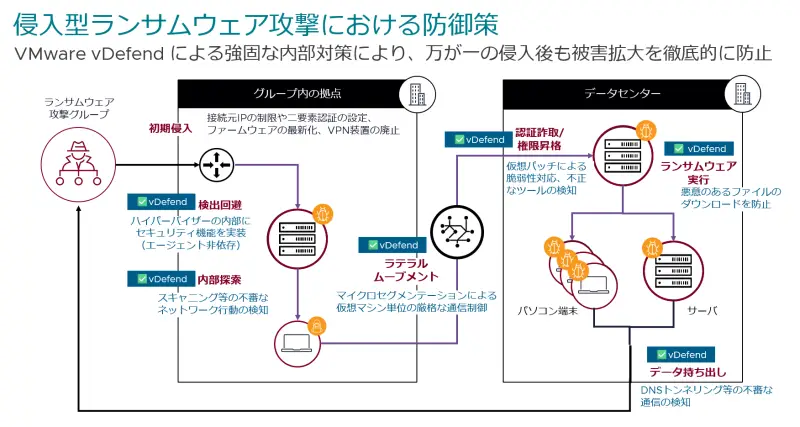
A perimeter firewall can’t contain an intruder who has already reached an internal segment if workloads there can communicate freely. VMware vDefend Distributed Firewall (DFW) applies controls at the ESX hypervisor and virtual network interface, including between VMs on the same distributed port group. Policies can follow a VM when vMotion moves it to another host, and administrators can apply them without changing existing IP or VLAN arrangements.
DFW supports rules based on application identification as well as network details, and can filter by fully qualified domain name for destinations with changing IP addresses. Tags can also drive policy: a VM marked with a security tag can receive the corresponding rules without relying on a fixed IP address.
For containment, define only the required paths between workload roles. A web server might need a specific SQL connection to a database server, while other protocols and management access remain blocked. The source also describes using distributed IDS/IPS with DFW to detect or block exploit signatures, including Log4Shell and SQL injection. Enable logging on relevant rules to record allowed and denied flows. Security Intelligence, formerly NSX Intelligence, can map VM communications and suggest rules based on observed traffic.
5. Encrypt VM data
vSphere VM Encryption protects virtual machine files, including VMDK disks, VMX configuration files and snapshots, at the hypervisor layer. The source describes protection for stored data and encrypted vMotion traffic. Because encryption runs on ESX, it does not require a guest OS agent or application change.
The article also says encrypted VMs can be decrypted and run only on appropriately configured hosts whose security has been validated, and points to TPM support as a way to check hypervisor integrity. Treat this as one part of the control set: encryption protects data confidentiality, while access restrictions and recovery controls address other failure paths.
6. Reduce direct access to ESX hosts
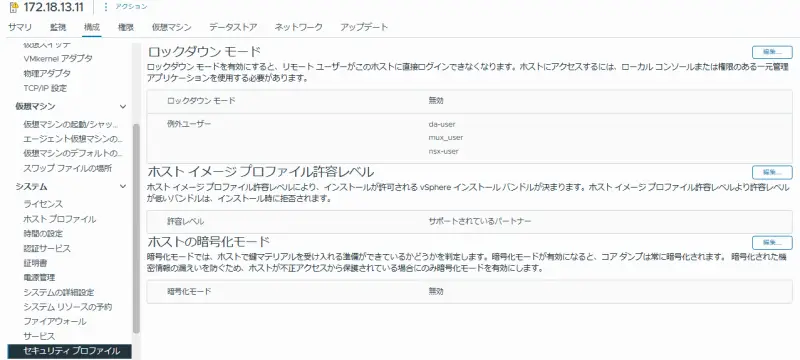
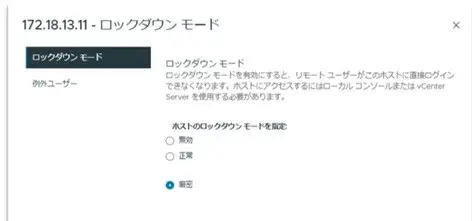
Lockdown mode routes host administration through vCenter Server. Normal mode still allows local DCUI access; Strict mode also stops the DCUI service, leaving vCenter Server as the management path. Before choosing a mode, account for the team’s recovery and maintenance procedures. The vCenter settings path given is ESX host > Configure > System > Security Profile > Edit.
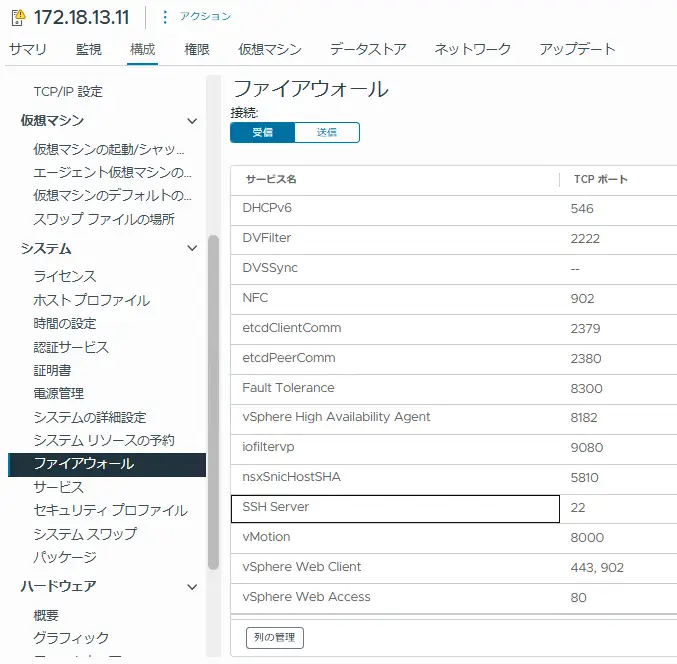
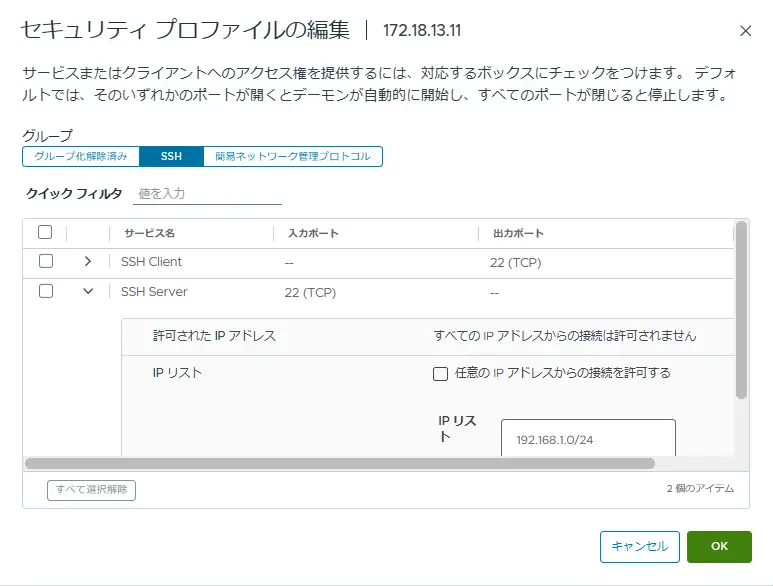
Keep SSH and ESX Shell disabled during routine operations, enabling them temporarily for troubleshooting when needed. If SSH must remain available, restrict its permitted source IP addresses in the ESX firewall. The article gives the path as ESX host > Configure > System > Firewall > Edit, then SSH > SSH Server.
At boot, UEFI Secure Boot checks that trusted, digitally signed components start, while TPM 2.0 records boot component measurements that can support remote verification. These controls help identify changes to the host’s startup chain.
7. Keep recoverable backups beyond the production domain
The final layer protects data when other controls fail. The guidance recommends isolating backup systems from the production Active Directory domain, using a workgroup or separate domain, and disconnecting backup networks outside backup windows where practical. That separation can make it harder for someone with production credentials to erase recovery copies.
Immutable storage adds another barrier. The source names S3 Object Lock and on premises immutable storage as options for retaining data that cannot be changed or deleted during a defined period. A cyber recovery vault can keep copies apart from the main network and scan them for signs of malware before recovery.
VCF Protection and Recovery and VMware Advanced Cyber Compliance (ACC) are described as combining immutable backups with recovery into an isolated environment and malware scanning. The aim is to reduce the risk of restoring an infected workload. The source recommends testing recovery at least twice a year in a separated network, confirming that operating systems and applications start correctly. A backup that has never been restored does not establish that the business can meet its recovery time objective (RTO) or recovery point objective (RPO).
For vSAN Data-at-Rest Encryption, the article advises against adding VM Encryption on top unless strict requirements call for it, citing possible CPU overhead and reduced deduplication efficiency. That tradeoff belongs in the design review alongside the protection requirement.
Turn the controls into a maintenance cycle
Start with an inventory of current settings, identify gaps, and implement changes in stages while checking workload impact. The guidance says many baseline measures—including ESX firewall rules, lockdown mode, MFA integration and network separation—may use existing capabilities or require limited additional investment. Prioritize exposed management paths, excessive permissions and missing recovery tests, then revisit the configuration as the private cloud changes. The useful measure of progress is whether controls are both active and tested under the conditions the team will face during an incident.


