Halloween Emoji for Microsoft 365: 30+ Symbols and Unicode Codes
Copy Halloween emoji into Office documents, or use Unicode hex codes and Alt+X in Word for Windows. Device fonts can change how symbols look.
For Halloween material in Microsoft 365, Office 2024 and Office 2021, emoji are a quick way to add a seasonal touch to a document, spreadsheet, slide or email. The list below includes more than 30 symbols, their Unicode values and alternate names to help you find the right character. You can copy and paste an emoji directly, or use its hexadecimal value in Word for Windows.
One practical detail: an emoji’s appearance can vary between Windows, iPhone, iPad and Android. A ghost or other symbol may look different on the recipient’s device, so check how it displays in the app and font you plan to use when the design depends on a particular look.
Halloween emoji and Unicode values
Use the search box in your symbol list to find an item by name, or sort the entries by clicking a column heading. The alternate names can also help when searching for a particular theme or character.
| Emoji | Name | Unicode hex | Alternate names or notes |
|---|---|---|---|
| 🎃 | Jack-O-Lantern | 1F383 | Carved Pumpkin, Gourd |
| 👻 | Ghost | 1F47B | Ghoul; appearance varies by device |
| 😱 | Face Screaming in Fear | 1F631 | Scream, Screaming Face, Home Alone |
| 😨 | Fearful Face | 1F628 | Scared, Surprised |
| 🕸️ | Spider Web | 1F578 | Cobweb, Orb Web, Spiderweb |
| 💀 | Skull | 1F480 | Grey Skull, Gray Skull, Skeleton, Death |
| ☠️ | Skull and Crossbones | 2620 | Death |
| 🪦 | Headstone | 1FAA6 | Grave, Tombstone, Death |
| ⚰️ | Coffin | 26B0 | Casket, Funeral, Death |
| 🦇 | Bat | 1F987 | |
| 🧟 | Zombie | 1F9DF | Reanimated; male, female and skin tone options |
| ⚱️ | Funeral Urn | 26B1 | Cremation, Ashes, Death, Vase |
| 🦴 | Bone | 1F9B4 | Dog, Skeleton |
| 🌕 | Full Moon | 1F315 | Lunar |
| 🧛 | Vampire | 1F9DB | Male, female and skin tone options |
| 🏚️ | Derelict House | 1F3DA | Home, disrepair, abandoned, haunted, old building |
| ⚠️ | Warning | 26A0 | Alert, Sign |
| 🐺 | Wolf | 1F43A | Animal, face |
| 😧 | Anguished Face | 1F627 | Pained |
| 👹 | Japanese Ogre | 1F479 | |
| 👺 | Japanese Goblin | 1F47A | |
| 👽 | Extraterrestrial Alien | 1F47D | |
| 👾 | Alien Monster | 1F47E | |
| 👿 | Imp | 1F47F | Horns, Frown |
| 😈 | Smiling Face with Horns | 1F608 | |
| 🕷️ | Spider | 1F577 | |
| 🤡 | Clown Face | 1F921 | |
| 🍬 | Candy | 1F36C | Sweets, Lolly, Lollies |
| 🐈⬛ | Cat | 1F408 | Can be changed to a black cat |
| 🪄 | Magic Wand | 1FA84 | |
| 🤢 | Nauseated Face | 1F922 | Unwell, sick |
Insert an emoji with Unicode hex
In Word for Windows, type the hexadecimal value shown in the table and press Alt + X. Word converts the value into the matching symbol. For example, entering 1F383 and pressing Alt + X produces 🎃. The same values can help you jump to a character in dialogs such as Insert Symbol. The Alt+X method in Word and Outlook has more detail about entering symbols this way.
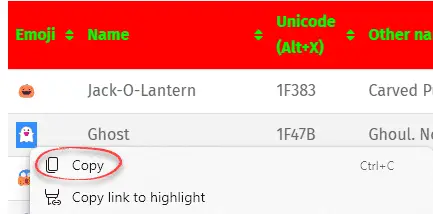
If you’re working in another app, copying the emoji from the list is usually the simplest route: select the symbol, copy it, then paste it into your document, sheet, slide or email. This avoids having to remember the code and works wherever the app accepts the character.
Search by name and check the font
The name in the table can help you locate a character in the Windows Emoji Panel or macOS Character Viewer. Search terms such as “Jack-O-Lantern,” “Spider Web” or “Vampire” are easier to use than trying to identify an emoji by its small on-screen image.
Recent Microsoft Office versions can substitute fonts to display symbols. In older Office versions, a symbol may need a font that includes the character, such as Segoe UI Emoji. If an emoji appears as an empty box or an unexpected symbol, check the font and the target app. Word’s symbol substitution behavior can also affect how a character appears.
More Halloween graphics for Office
Emoji work well for short labels and messages. For a designed page or presentation, Microsoft 365, Office 2024 and Office 2021 also include icons and picture options. See these guides to Halloween icons, graphics and pictures for Word, PowerPoint and Outlook and other Halloween help for Microsoft Office.
Other ideas include turning a photo into a carved pumpkin with free AI tools, remaking pictures for Halloween with Microsoft Designer, or creating animated designs with Designer. For ready-to-use images, there are also free witch graphics.
Color and illustration choices can help keep a document or slide consistent. The pumpkin color guide includes Hex and RGB values, while a separate guide covers skeleton and skull graphics for Word, PowerPoint and Office.
For a quick message, copy and paste is enough. When the emoji is part of a layout that others will view on different devices, preview the finished file in the target app and check that the font renders the characters as intended.


