DHCP Reservations Keep Critical Network Devices on Predictable IP Addresses
DHCP reservations give cameras, printers and network equipment stable addresses. DDI Central adds IPv4 and IPv6 host management, grouping and lease controls.

When a camera, printer, access point or router changes its DHCP address, the disruption can reach beyond that device. Monitoring tools and other network services may still be looking for it at its previous address. DHCP reservations give administrators a way to keep those assignments predictable while continuing to use DHCP.
ManageEngine DDI Central provides a console for creating and managing DHCP host entries. Administrators can associate a device identifier with a reserved address and subnet, then let the DHCP server issue that address when the device requests a lease. This avoids configuring static addresses individually on every device, while keeping address assignments under central administration.

Why reserve addresses
Dynamic DHCP allocation draws addresses from an available pool. A device’s assigned address can change as leases and network configurations change, creating extra work when dependent systems expect a known address. Administrators may need to investigate connectivity problems or update those systems after an assignment changes.
A reservation ties a device’s MAC address or another supported client identifier to a designated IP address. When that client requests a lease, the DHCP server assigns the reserved address. Devices that communicate with management platforms, monitoring systems or other network services can therefore retain predictable addressing without requiring manual static configuration on each device.
The approach is useful for infrastructure and other equipment that needs consistent reachability, including surveillance cameras, routers, network printers and VoIP phones. The benefit is practical: DHCP continues to handle address assignment, while administrators set aside particular addresses for known clients.
Creating IPv4 and IPv6 host entries
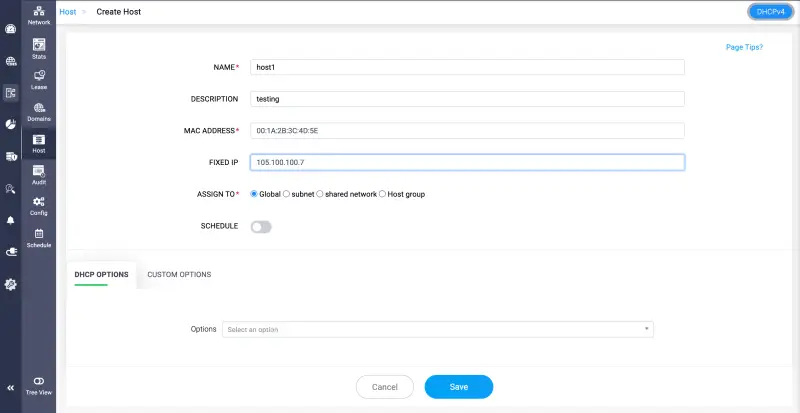
In DDI Central, an administrator can create a DHCP host entry with the device’s identifying details, subnet and reserved address. For an IPv4 surveillance camera, the example configuration includes a hostname, MAC address, fixed IP address and subnet. The administrator can also set the DHCP options the device requires.
IPv6 reservations need an identifier suited to the client. DDI Central supports host types such as Client ID, Subscriber ID, Remote ID and Client Linklayer Address. After selecting the relevant type and entering its identifier, the administrator assigns a fixed IPv6 address or prefix and associates the entry with the correct subnet.
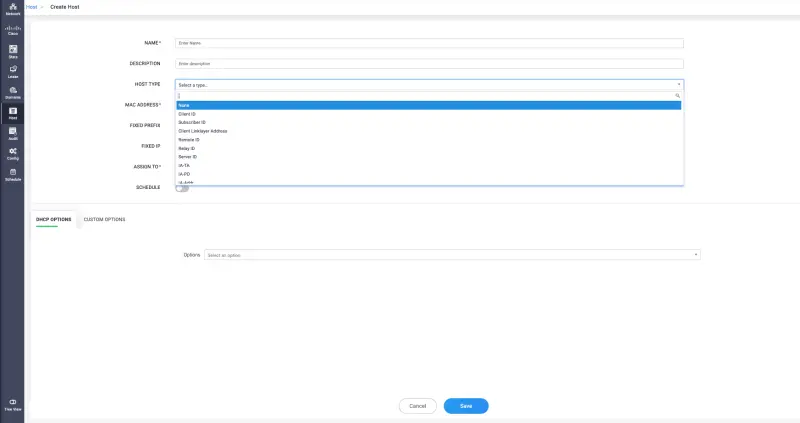
That distinction matters when teams manage both address families: the right client identifier must be available for the device and match the host entry. DDI Central’s host settings accommodate several IPv6 identification methods, while the reservation still depends on associating the entry with the intended subnet and address.
Finding addresses and organizing hosts
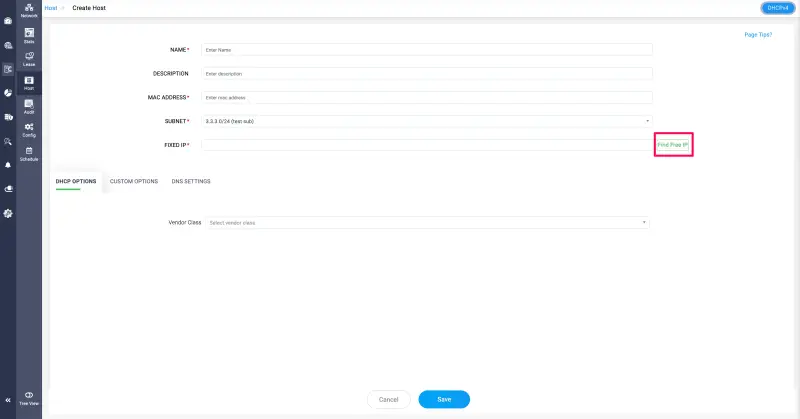
Before creating a reservation, administrators need an available address in the target subnet. DDI Central’s Find Free IP capability identifies the next available IP after the administrator selects a subnet. This can reduce manual searching through a range, especially when several requests are waiting or the address pool is large.
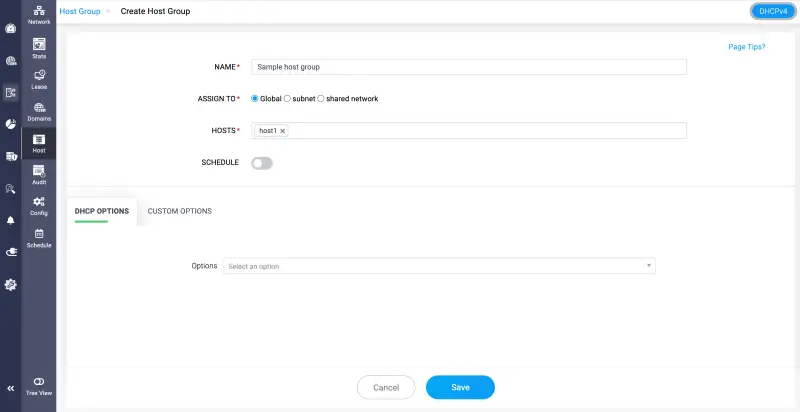
As device counts grow, the entries themselves can become harder to manage. The example describes a floor with 25 wireless access points. DDI Central’s Host Groups let administrators organize related DHCP hosts together, making them easier to manage collectively than as a long series of unrelated entries.
Restricting a client’s DHCP access
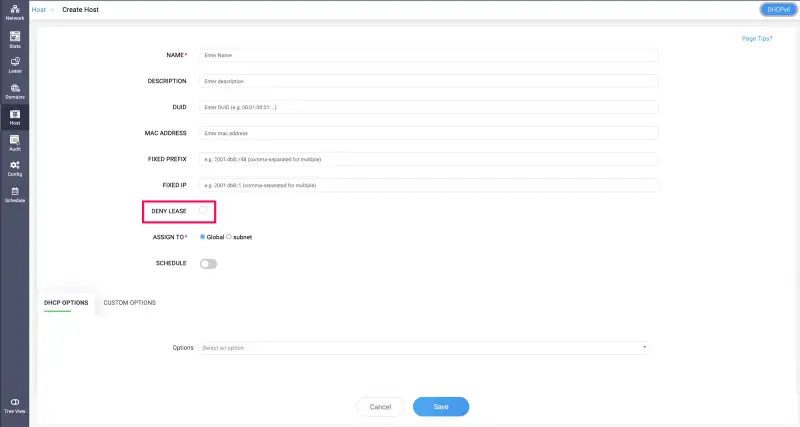
Reservations also provide a place to manage problematic clients. If an unfamiliar device repeatedly requests addresses, an administrator can create a host entry and enable the Deny Lease option to prevent it from receiving DHCP leases.
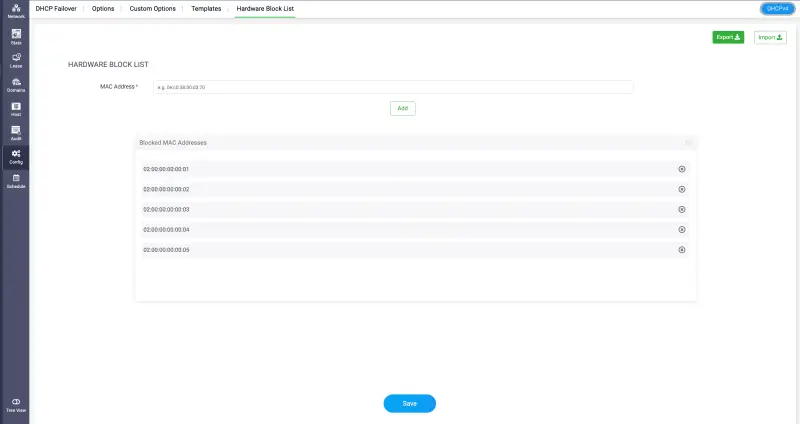
For a device that already has a reservation but is causing network problems, DDI Central also offers MAC address blocking. The administrator can locate the device and restrict it by its hardware address, preventing it from receiving further DHCP leases while the underlying issue is investigated.
What administrators should check
For teams adopting reservations, the main operational work is maintaining accurate host details: the client identifier, subnet, reserved address and any required DHCP options. IPv6 clients may require a different identifier type from IPv4 clients, so the host entry needs to reflect how each device identifies itself. Administrators should also keep entries organized as their device inventory grows and review lease restrictions when troubleshooting client access.
DDI Central brings reservation creation, available address lookup, host grouping and lease controls into one management console. For networks with devices that depend on stable addressing, these functions can reduce address-related troubleshooting while preserving DHCP-based assignment. As the network expands, a maintained inventory of reservations and identifiers helps keep critical devices reachable by the services that depend on them.