Microsoft Graph AuditLogQuery Migration Requires Script Changes
AuditLogQuery changes query handling, property names and AuditData formats. Administrators should allow for queued processing and test converted scripts carefully.
Moving scripts from Search-UnifiedAuditLog to Microsoft Graph’s AuditLogQuery API changes how queries run and how results are handled. The old Exchange Online cmdlet returns records synchronously; AuditLogQuery submits a job to Microsoft Purview Audit, waits for processing, then retrieves the results. That shift affects script flow, response times and data parsing, so a direct cmdlet swap won’t work.
Administrators and developers will need to revise and test their scripts. AI tools may help produce an initial conversion, but workload differences and inconsistent audit data still require manual checks. In particular, verify the fields used to submit searches, the names of returned properties and the way each script reads AuditData.
Query jobs change response times
With Search-UnifiedAuditLog, a script runs a search and receives results immediately. AuditLogQuery instead places a request in a processing queue. Purview processes it as service capacity allows, after which the script can retrieve the records. Depending on service load and the number of records requested, this can take ten minutes or longer.
That delay matters for scripts built to answer time-sensitive questions, such as when a user last created a file or email. Those scripts will have to wait for the job to complete or use another method, if one is available. Teams should identify these dependencies before converting scheduled jobs or operational reports.
The unified audit log covers activity across Microsoft 365 workloads, including user actions and internal system activity. But while audit records share basic fields such as the operation, timestamp and actor, their AuditData content varies by workload. SharePoint Online records may be relatively straightforward to interpret; details such as product SKU information in Entra ID license assignment records can be harder to process consistently.
Update field names and filters
AuditLogQuery changes several audit record header names. For example, UserIds becomes UserPrincipalName, Operations becomes Operation, and CreationDate becomes CreatedDateTime. The new names align with conventions used elsewhere in Graph, but every script reference needs to be checked so that renamed fields don’t produce empty or incorrect results.
Query parameters also differ between Search-UnifiedAuditLog and the New-MgSecurityAuditLogQuery cmdlet. The Graph cmdlet accepts parameters such as UserPrincipalNamesFilter, recordTypeFilters, operationFilters, objectIdFilters, keywordFilter and ipAddressFilter. It also supports AdministrativeUnitIdFilters, which has no equivalent in the older cmdlet.
For date ranges, StartDate and EndDate map to filterStartDateTime and filterEndDateTime. Some organizations use UTC dates for all searches, so check that the converted script handles time values as intended. When using direct Graph API requests, query parameters must be supplied in a request body; the SDK cmdlet can accept named parameters or a request body. ResultSize, SessionId and SessionCommand aren’t used by the Graph API.
Handle AuditData according to the retrieval method
Scripts that parse records from Search-UnifiedAuditLog often convert the JSON in AuditData with code such as:
[array]$AuditData = $Rec.AuditData | ConvertFrom-JsonThat conversion step may no longer apply. A direct Graph API request returns AuditData as a PowerShell object whose properties can be accessed directly, for example:
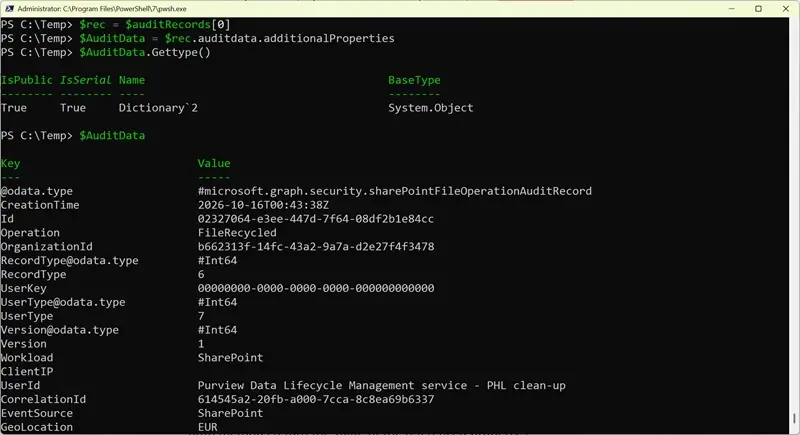
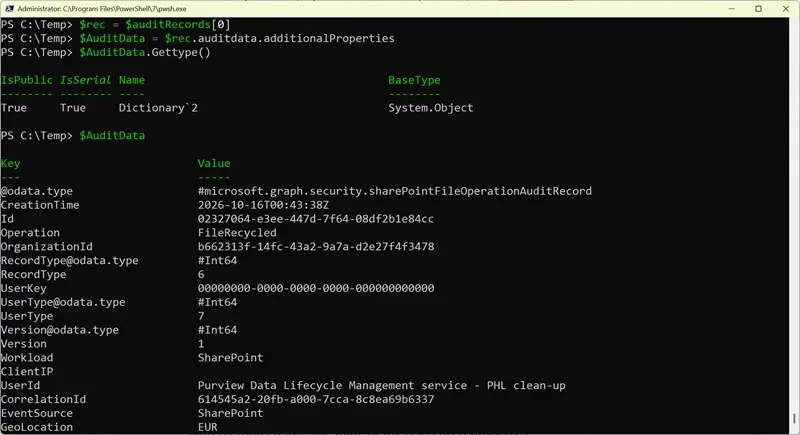
$Rec.AuditData.SiteUrlRecords retrieved with Get-MgSecurityAuditLogQueryRecord use a different shape: the audit fields are stored in the additionalProperties dictionary. The Graph PowerShell SDK uses that dictionary because the workload-specific fields in AuditData aren’t strongly typed.
$AuditData = $Rec.AuditData.additionalProperties
$AuditData.SiteUrl
$AuditData["SiteUrl"]
Both access patterns can return a dictionary value. Use the property name exactly as it appears in the dictionary: SiteUrl works in the example, while siteUrl does not. Check casing and the retrieval method when a converted script unexpectedly returns blank values.
Plan the conversion in stages
A practical conversion follows the job lifecycle. First, connect to Graph interactively or with an app-only session and grant the permissions the query needs. AuditLogsQuery.Read.All allows access to audit events generated by all workloads. Next, submit the query with the appropriate filters, monitor its status until processing finishes, retrieve the records into an array, and update the code that extracts the fields of interest.
Review any supporting data lookups too. A script that previously used Get-ExoMailbox to build a mapping of user principal names to display names may need a Graph-based lookup using Get-MgUser when the script connects to Graph for audit jobs. The audit query conversion can therefore involve changes beyond the search command itself.
Use the example to check behavior
A sample script, Report-NonUserAuditEvents.PS1, demonstrates both methods. It retrieves audit records for the previous seven days, then excludes records for actions performed by tenant users to focus on system activity. Larger tenants may need a shorter search period to stay within the 50,000-record limit cited for Search-UnifiedAuditLog.
Use a representative workload and date range when validating a conversion. Compare the records returned, confirm that filters and field references still match the intended query, and check how AuditData is represented by the retrieval method in use. The main operational change is clear: scripts must account for queued processing as well as differences in the returned data before they’re ready to run reliably.


