Microsoft Will Remove Copilot Prioritize My Inbox by March 2027
Microsoft is withdrawing Copilot Prioritize My Inbox by March 2027. Admins should expect the Outlook option to disappear automatically for eligible users.
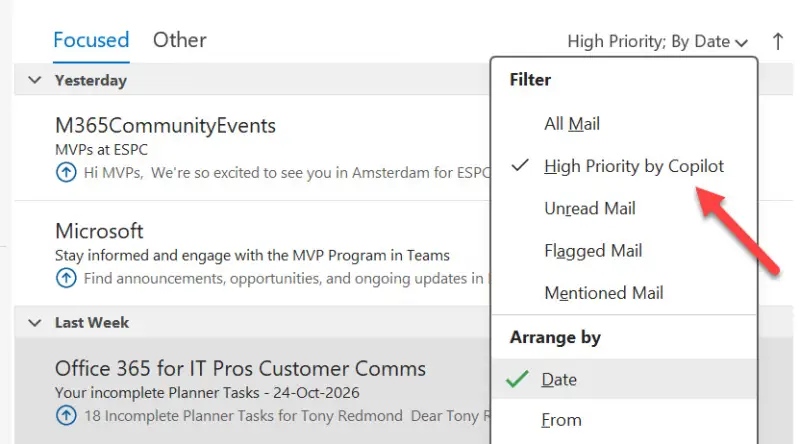
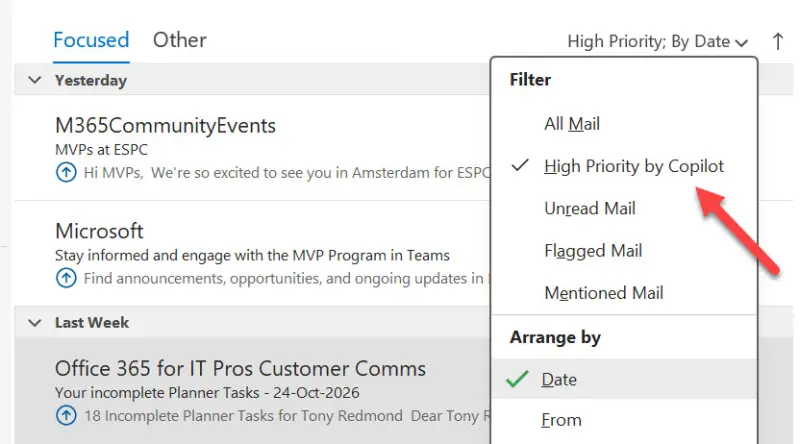
Microsoft is withdrawing Copilot Prioritize My Inbox, with removal from Outlook menus scheduled to finish by the end of March 2027. The rollout began on October 26, 2026, and requires no action from users or administrators. For Microsoft 365 teams, the practical change is straightforward: eligible users will lose a Copilot feature that marks messages it judges important, while Outlook’s Focused Inbox remains available.
Microsoft recorded the change in message center notification MC1519861, updated 22 October 2026. The company said the withdrawal will simplify the Outlook Copilot experience and concentrate ongoing investment. The scope is limited to people who currently have access to Prioritize My Inbox, which in practice means users with Microsoft 365 Copilot licenses.
The feature’s removal is gradual, so administrators may see it disappear from Outlook at different points during the announced withdrawal period. No user setting or admin configuration is required to initiate the change. The option shown in Outlook classic will eventually be removed from menus, along with the feature in the other Outlook clients where it is available.
Another attempt to sort incoming email
Prioritize My Inbox belongs to a long line of Microsoft efforts to help people separate useful messages from the rest. The earlier Clutter feature, first shown at the revamped Microsoft Exchange Conference in late 2012, tried to identify email that users were unlikely to need and move it into a Clutter folder. It learned from user behavior and later from instructions users configured, but its decisions could be difficult to predict.
Microsoft began rolling Clutter out for Outlook Web App in late 2014. The feature continued to change over the following years, but the basic challenge persisted: an automated filter has to infer what matters to an individual from their actions and message patterns. A misclassified message can be inconvenient, and users may not know why it was moved.
Focused Inbox took a different route. Microsoft acquired Acompli as it worked to improve its mobile email offering, then rebranded the app as Outlook for iOS and Android in early 2015. Focused Inbox became a central feature of that client and eventually reached Outlook across platforms, with desktop support arriving in 2017.
Focused Inbox remains the familiar alternative
Focused Inbox divides messages into Focused and Other views. The views filter the same Inbox folder according to a message property, rather than moving messages into a separate folder. Users can correct mistakes by moving a message between the two views; over time, those corrections can help the feature reflect their preferences.
That training takes patience, and the experience is not universally popular. Some users value the separation once it has adapted to their habits. Others have long found the system opaque, much as users did with Clutter. This tension matters for Prioritize My Inbox: AI can surface messages that appear significant, but confidence in the result depends partly on whether users can understand and shape the criteria.
Prioritize My Inbox could be used alongside Focused Inbox, so the two features offered overlapping ways to draw attention to selected email. The Copilot feature identified messages it considered high priority, indicated in Outlook classic with an upward-facing arrow in message snippets. Focused Inbox continues to sort mail into its two views. Microsoft’s withdrawal therefore removes one layer of automated prioritization without taking away that established filtering option.
What administrators should expect
For tenant administrators, the announced process calls for awareness rather than a configuration change. The withdrawal started October 26, 2026, and is expected to complete by the end of March 2027. Teams supporting users with Microsoft 365 Copilot licenses can explain why the menu option may vanish during that period and point users to Focused Inbox if they want a familiar way to separate incoming mail.
There is no indication in the announcement details that administrators need to migrate data or change a tenant setting. The feature is being removed from the Outlook interface, and Microsoft says the process proceeds without user or admin intervention. Organizations that have incorporated Prioritize My Inbox into user guidance should review that material before the removal completes, so instructions do not continue to promise an option that is disappearing.
Microsoft is shifting toward broader assistants
My read is that Prioritize My Inbox was vulnerable because it addressed one narrow task beside other ways of sorting mail. Microsoft has been adjusting how Copilot appears across its Office apps, while Copilot Chat is becoming more integrated into those applications. Copilot Cowork and Autopilot, also referred to as Microsoft Scout, point toward assistants that can handle a wider range of tasks for users.
Inbox triage remains a natural job for an assistant. A more flexible approach could let people describe what matters in ordinary language and apply those preferences as messages arrive. The announcement does not say that Microsoft will replace Prioritize My Inbox with such a capability, so administrators should treat that possibility as a direction to watch rather than a promised feature.
For now, the operational takeaway is clear: eligible users will lose Copilot Prioritize My Inbox during the announced withdrawal window, while Focused Inbox remains. IT teams can update internal guidance, answer questions about the disappearing option and watch for further details about how Microsoft’s broader Copilot experience handles email triage.


