Microsoft Graph Adds Read-Only Exchange Custom Attributes for Synced Groups
Graph can read Exchange custom attributes on groups synchronized from Active Directory, but changes still require Exchange Online tools.
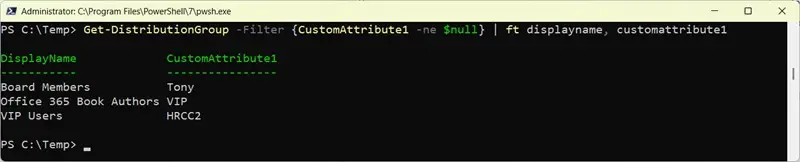
Microsoft Graph can now read the fifteen Exchange custom attributes on groups synchronized from on-premises Active Directory, giving administrators another way to inspect group data in Microsoft 365. The support, introduced in September 2026, is read-only: teams that need to change attribute values must still use Exchange Online cmdlets, where writeback is enabled for Entra Cloud Sync.
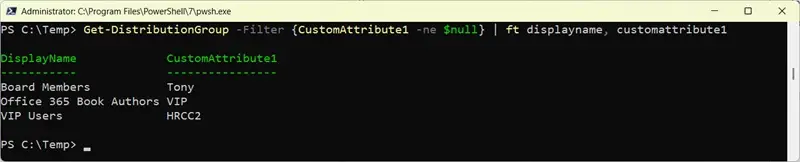
That distinction matters in hybrid environments, where group data may support business processes and be maintained in Active Directory or Exchange. Graph access makes those values available to queries and automation, but it doesn’t make Graph the place to edit them. Administrators should keep the existing write path in mind when building workflows that both report on and update group attributes.
Which groups and attributes are in scope
The feature applies to Entra ID groups synchronized from on-premises Active Directory through Microsoft Entra Cloud Sync. The supported group types include distribution groups and security groups, whether mail-enabled or not. Microsoft 365 groups are outside this synchronization feature’s scope because they cannot be synchronized from Active Directory.
After groups have been synchronized, administrators can retrieve their properties with the Microsoft Graph PowerShell Get-MgGroup cmdlet. The custom attributes are exposed through the onPremisesExtensionAttributes resource, which Graph also supports for user accounts.
For example, this query returns synchronized groups where Exchange custom attribute 1—represented in Graph as extensionAttribute1—has a value:
Get-MgGroup -Filter "onPremisesSyncEnabled eq true and onPremisesExtensionAttributes/extensionAttribute1 ne null" -Property Id, onPremisesExtensionAttributes, displayName -ConsistencyLevel Eventual -CountVariable GroupCountEntra ID treats this filter as an advanced query, so it uses the eventual consistency level. The example also includes -CountVariable, which asks the SDK to retrieve the number of matching objects and store it in a PowerShell variable. That count is separate from the consistency setting and isn’t what makes the query advanced.
A second query can find synchronized groups that have a mail address and aren’t Microsoft 365 groups. It requests the extension attributes and expands them in the output:
Get-MgGroup -Filter "onPremisesSyncEnabled eq true and mail ne null and NOT groupTypes/any(c:c eq 'Unified')" -Property id, displayName, onPremisesExtensionAttributes -ConsistencyLevel eventual -CountVariable count | Select-Object id -ExpandProperty onPremisesExtensionAttributesThis provides a way to inspect the fifteen single-value custom attributes on the matching groups. Graph support does not extend to the five multi-value custom attributes available on Exchange Online mail-enabled objects, so administrators who rely on those fields will need to account for that gap in their reporting and automation.
Reading values and changing them are separate tasks
Although the Graph API exposes the attributes for reading, it currently doesn’t support updating them for these synchronized groups. Use Exchange Online cmdlets such as Set-DistributionGroup to change values, provided writeback is enabled for Entra Cloud Sync.
Microsoft hasn’t explained the reason for the read-only boundary. One possible factor is how hybrid group attributes are sourced and maintained: an organization may use values in on-premises groups for business processes, with synchronization making that data available in Microsoft 365. The feature may also be designed around scenarios where Active Directory remains the source of authority for groups.
A likely technical constraint is that Graph’s group update support does not cover Exchange-owned objects such as distribution groups. The Update-MgGroup cmdlet can’t update a distribution group, which aligns with the absence of Graph write support for its custom attributes. Graph updates may be more applicable to Entra security groups and Microsoft 365 groups, though the latter are not part of this Active Directory synchronization scenario.
For administrators, the practical design is to treat Graph as a read path for these values and Exchange Online as the write path. Any process that reads an attribute through Graph and then changes it should account for that split, as well as the writeback prerequisite. The Cloud Sync group types and synchronization scope are described in Microsoft’s Entra Cloud Sync FAQ.
When to include a count variable
Advanced Graph queries often show both -ConsistencyLevel Eventual and -CountVariable, but the two parameters do different jobs. The consistency level tells Graph to process the request as an advanced query. The count parameter asks the PowerShell SDK to return a count of matching objects and save it in a variable.
A query that uses an advanced filter can omit the count parameter when the count isn’t needed. For instance, this query returns groups whose display names begin with “Office”:
[array]$Groups = Get-MgGroup -Filter "startsWith(DisplayName, 'Office')" -ConsistencyLevel Eventual -CountVariable CountThe count variable can be removed if the script only needs the matching groups. Some developers keep it in their advanced queries because the extra request overhead is usually negligible, but it’s a convenience rather than a requirement for the filter.
Graph access to these attributes gives administrators a useful route for inspecting synchronized group data alongside other directory information. For now, scripts should keep attribute reads and writes on their respective paths, and teams should check whether their workflows depend on multi-value attributes that Graph does not expose here.


