Exchange Online’s November 2026 Outage: Cause, SLA Impact and Admin Takeaways
A 23-hour Exchange Online outage exposed a gateway failure across Microsoft 365. Here’s what the preliminary report says and what tenants should check.
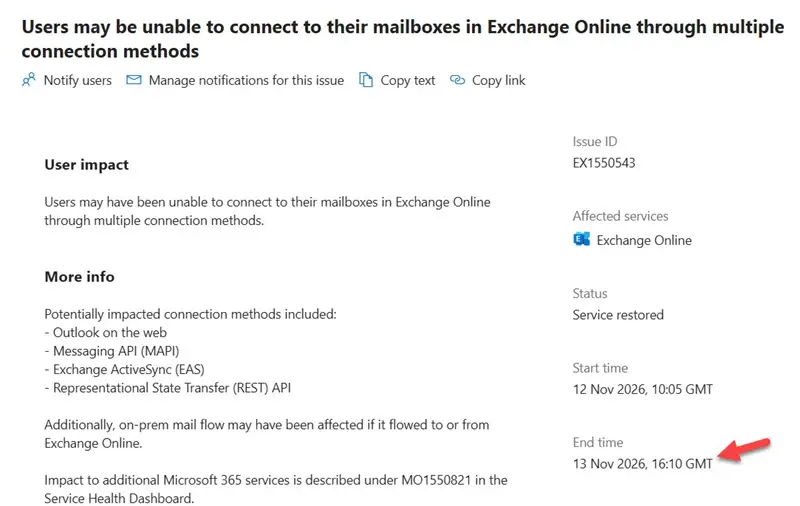
Exchange Online’s November 2026 outage exposed a weak point beyond its mailbox databases: the shared network gateways that accept and route connections into the service. Microsoft’s preliminary Post-Incident Report attributes the failure to a months-old Windows defect combined with heavier gateway traffic and reduced capacity. For administrators, that distinction matters. Outlook was where many users saw the problem, but the underlying service failure also affected other Microsoft 365 workloads.

Microsoft recorded the incident as EX1550543. Its preliminary report gives a duration of 23 hours and 50 minutes, from November 12 to November 13, 2026. A separate incident, MO1550821, tracked knock-on effects in other Microsoft 365 services over the same period. Microsoft has said it will publish a final Post-Incident Report later.
What failed, and how the outage spread
The preliminary account describes three conditions that came together. First, a Microsoft 365-specific Windows change began rolling out globally in July. It contained a latent defect that could cause lock contention under certain loads. As the contention increased, gateway servers could run out of CPU and memory and stop responding.
The problem escaped testing because it was more likely to appear on newer hardware with higher core counts than on the less powerful systems used for load testing. That meant the defect could remain dormant until the affected gateway encountered the right combination of hardware and workload.
Second, around 15 hours before the outage, Teams failed over from an alternative network gateway to the primary gateway also used by Exchange Online. Microsoft described this as a normal resiliency operation. However, it increased traffic on the primary gateway and changed the pattern of requests that gateway had to handle.
Third, an unrelated issue had already taken about 14% of gateway server capacity offline. Microsoft believed the remaining capacity was sufficient. In combination with the increased traffic, though, the reduced capacity helped push the infrastructure into the conditions that triggered the Windows defect.
The impact spread globally because normal isolation boundaries between gateway capacity units and regions failed to contain the cascading problem. Those boundaries, often called bulkheads, are intended to limit the reach of a failure. In this incident, the failure crossed those limits, allowing disruption to spread beyond the initially affected capacity.
Once servers began failing, traffic shifted to other servers that were already under pressure. That added load caused further failures, which redirected still more traffic. The sequence described in Microsoft’s preliminary report is a familiar risk in large shared systems: a local shortage can become a wider outage when routing moves demand onto capacity that is already strained.
Recovery proved difficult for the same reason. As servers came back online, accumulated traffic hit them immediately and caused some to fail again. Microsoft’s automated recovery mechanisms were not designed for a situation in which such a large share of the infrastructure was unresponsive. A standard rollback was also unavailable because the defective Windows change had been deployed successfully more than three months earlier.
Microsoft eventually identified the defect and developed a fix that restored the previous known-good Windows code path. It then recovered service in controlled groups: taking servers offline, applying the fix, restarting them and gradually returning capacity to service.
Exchange Online was the service at fault
Although many users encountered the outage through Outlook, Microsoft’s account points to Exchange Online and its network gateway infrastructure as the problem. Outlook classic has stronger offline capabilities than the new Outlook, so users with cached mail could be better placed to keep working. Mobile clients had less room to work around the interruption. Other clients that connect through ActiveSync, POP3 or IMAP4 were also affected by the service disruption.
That helps explain why Outlook was widely blamed: it is the familiar interface through which many people read and send email. But the same Exchange Online dependency extends to clients such as Apple’s iOS Mail, Samsung’s mail client and Thunderbird. A client can behave differently during a service outage, but it cannot restore access to a mailbox when the service it connects to is unavailable.
Microsoft said there was no indication that malicious or cyber activity caused the incident. Charles Lamanna, Microsoft EVP for Copilot, Agents, and Platform, described the conditions as “cascading failures + thundering herds at our network perimeter.” That characterization fits the sequence in the preliminary report: traffic increased, capacity was lower than expected, servers failed, and redirected traffic compounded the pressure.

Why other Microsoft 365 workloads felt it
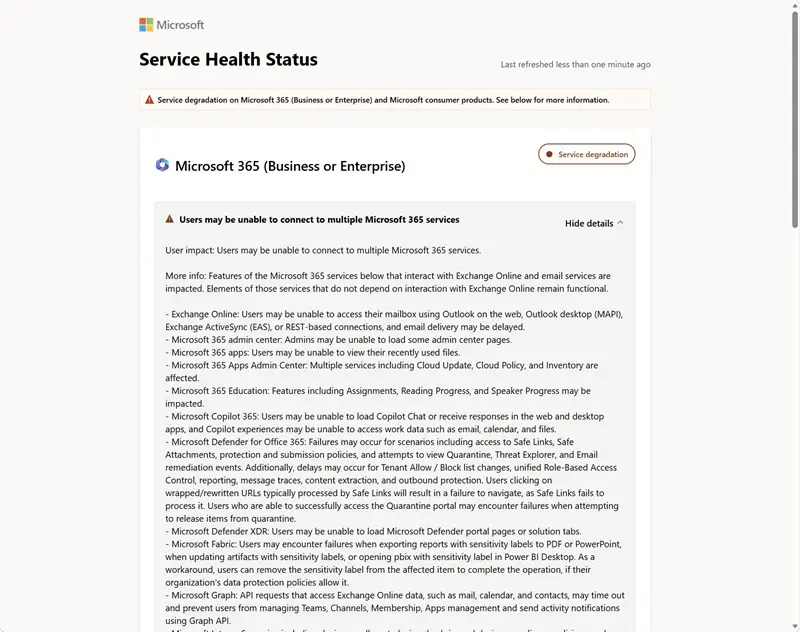
Exchange Online is more than an email endpoint within Microsoft 365. Other workloads rely on it for functions that may not be obvious to users. SharePoint Online can use Exchange Online to send file-sharing notifications, while Teams uses it for meeting scheduling. Exchange Online also stores compliance records associated with features such as Microsoft Copilot.
As Exchange Online performance declined, dependent functions in other services could fail even when those services’ own data remained available. Users might still have been able to work with files in SharePoint Online and OneDrive for Business libraries, for example, while being unable to share those files through email notifications. Copilot Chat could fail if it could not connect to Exchange Online to store compliance records.
Teams, OneDrive, SharePoint and Office apps could recover sooner when they were able to fail away from the affected gateway. Exchange Online could not move away from that gateway at the necessary scale, which helps account for its longer and more severe impact. For administrators, the practical lesson is to map the functions users depend on across services, rather than treating each workload as an isolated application.
The scale of Exchange Online makes these dependencies significant. Microsoft speakers at the MEC 2022 conference said the service then spanned 300,000 physical mailbox servers and handled 9.2 billion messages each day. Microsoft has not published an updated server count. Separately, Microsoft’s FY27 Q1 results indicated more than 470 million paid Microsoft 365 seats; the potential user population is higher when free seats used by partners and others are included.
The outage also prompted speculation about whether staff departures left Microsoft without enough experienced engineers to resolve the failure quickly. The available information does not establish that connection. It is plausible that experience with Exchange Online, its service dependencies and datacentre infrastructure could help during a complex incident, but the report does not say whether staffing affected diagnosis or recovery. The scale and unusual failure pattern also make direct comparisons with earlier incidents difficult.
Estimating the availability impact
Microsoft’s Service Level Agreements for Online Services define Exchange Online downtime in terms of users being unable to send or receive email through Outlook Web Access. That gives a direct measure of access to the service. The calculation uses user-minutes: the number of minutes for which users could not send or receive email. Because tenants connect through different datacentre regions and users may recover at different times, their measured downtime can vary.
November has 43,200 minutes. Using Microsoft’s preliminary duration of 23 hours and 50 minutes, or 1,430 minutes, a tenant in which every user was unable to access Exchange Online throughout that period would have a monthly uptime percentage of:
(43,200 − 1,430) / 43,200 = 96.69%
This is an illustrative calculation, not a result for every tenant. If some users retained service, or different users recovered at different times, Microsoft’s user-minute calculation would produce a different percentage. The incident duration alone does not show how many users in a particular tenant were affected for the full period.
Microsoft’s published service-credit tiers are 25% for uptime below 99.9%, 50% below 99% and 100% below 95%. Under the full-impact example above, 96.69% falls in the 50% tier. Whether a tenant qualifies depends on its measured availability and the applicable SLA terms.
| Uptime percentage | Service credit |
|---|---|
| Below 99.9% | 25% |
| Below 99% | 50% |
| Below 95% | 100% |
A credit applies to future fees for the affected service; Microsoft does not return cash. Its SLA describes service credits as the sole and exclusive remedy for performance or availability issues and says they do not compensate for other forms of loss. The credit is tied to the relevant service fees, so an Exchange Online credit should not be read as a percentage reduction in the price of a broad Microsoft 365 subscription.
For comparison, Microsoft lists Exchange Online Plan 2 at $8 per user per month in the United States. That price does not establish the value Microsoft assigns to Exchange Online within a Microsoft 365 E5 subscription, listed at $60 per user per month. The eligible service fee and the relevant SLA terms determine the credit calculation.
Other services need separate assessment against their own SLA definitions. A user’s inability to share a file because Exchange Online could not deliver a notification may differ from being unable to access the file itself. Likewise, an issue with Copilot Chat’s connection to Exchange Online may not be measured the same way as email availability. The extent of each disruption and how Microsoft defines availability for that service will matter.
Microsoft does not apply service credits automatically. Customers must submit a claim through the Microsoft 365 admin center or through their Cloud Solution Provider. Claims related to the November 2026 incident must be filed by the end of December 2026. Administrators considering a claim should review the incident information for their tenant, identify affected users and services, and check the relevant SLA terms.
What administrators should take from the outage
The incident does not show that on-premises Exchange Server avoids major failures. An outage in a company’s own deployment can disrupt that organization just as severely; a cloud failure can affect many organizations at once. The difference is the scale and shared nature of the impact.
Exchange Online’s mailbox database resiliency uses Database Availability Groups, or DAGs, and tenants are distributed across forests made up of DAGs. The failure described here was in the infrastructure responsible for accepting and routing connections into the service. That distinction should shape continuity planning: database replication and mailbox resilience do not, by themselves, protect users from a widespread gateway failure.
Teams should review which daily tasks depend on Exchange Online even when users are working in other Microsoft 365 applications. They should also understand which client features work offline, how users will communicate during an email interruption, and what evidence they need to assess service impact and any SLA claim. The source material does not specify a tenant-side configuration change that would prevent this type of gateway failure.
The longer-term question is how shared infrastructure will handle growing demand from both people and software agents. Satya Nadella has described a possible future Microsoft workforce of 200,000 employees and between 2 million and 20 million agents “all in a loop.” If agents beyond Microsoft rely on Exchange Online for mail, calendars, contacts or mailbox actions, they could add substantial demand. That possibility makes gateway capacity, isolation boundaries and recovery under heavy traffic areas to watch in Microsoft’s final report.
Microsoft 365’s connections are useful when they work, but they also mean a failure in one shared service can surface across many workloads. For administrators, the immediate work is to document those dependencies, assess the tenant-specific impact, and track the final report and any service-credit deadline.


