Purview Auto-Labeling Extends Sensitivity Controls to Legacy Office Files
Purview auto-label policies can now label legacy DOC, PPT and XLS files in SharePoint Online and OneDrive for Business, helping apply existing content controls.
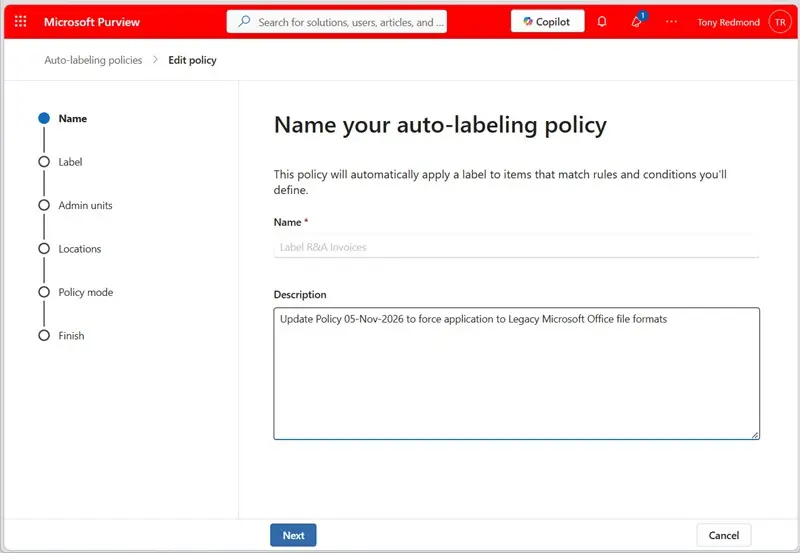
Legacy Office files enter Purview auto-labeling
Old DOC, PPT and XLS files in SharePoint Online and OneDrive for Business can now be processed by Microsoft Purview auto-label policies. That gives administrators a way to apply sensitivity labels to material that may still sit in team sites and personal work storage, even though it uses file formats that predate modern Office documents.
Microsoft’s update, listed as MC1530948 on 29 October 2026, adds server-side labeling for these legacy formats. The preview is active, with general availability expected at the end of November 2026. The change matters for organizations that rely on sensitivity labels to control access to documents or to restrict how selected files are used by AI tools.
There is a practical distinction to keep in mind: this is an extension to the server-side auto-labeling workflow. It does not add a general ability to label legacy files in Office applications. Administrators should therefore consider where these files are stored, which existing policies apply to them, and how users will access files after a label is assigned.
What administrators need to change
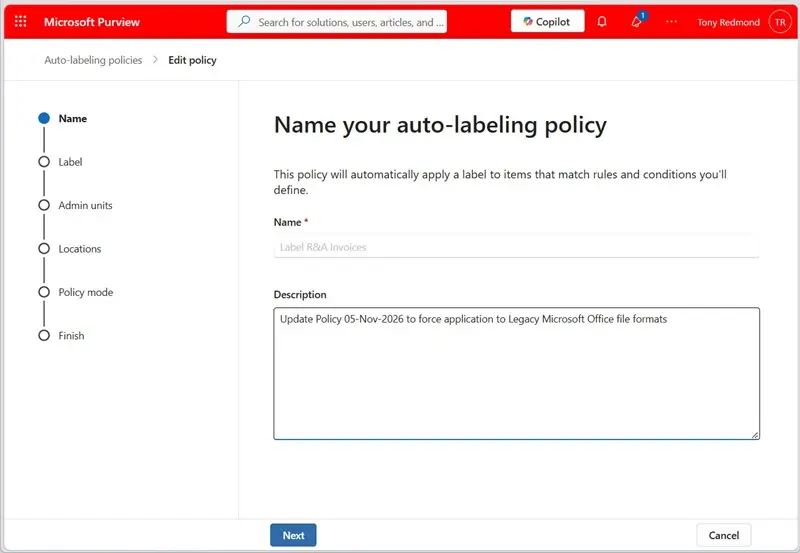
New auto-label policies include support for the legacy formats automatically. Existing policies need to be modified so Purview reevaluates them under the updated conditions. The described change can be as small as updating the policy comments, as shown below.
Microsoft recommends running updated policies in simulation mode first. This lets administrators review which files match and whether the proposed labels are appropriate, including matches among DOC, PPT and XLS files. Simulation is recommended, though the update does not make it a requirement. For teams with large or unevenly maintained document libraries, reviewing those results can help catch unexpected matches before labels are applied.
The change does not describe a separate labeling setting for each file extension. The administrative step is to update the existing policy so it is reevaluated, then check the results. Teams should pay particular attention to whether the policy’s conditions describe the sensitivity they intend to identify in older documents. A legacy file can contain useful, authoritative material as well as content that has been superseded; its age alone does not establish which label is suitable.
How labels and protection apply
The Microsoft Information Protection SDK has supported legacy Office formats for some time. Purview’s labeling experience across Microsoft 365, however, has focused mainly on newer formats. With this update, the server-side auto-labeling workflow can process the older file types listed in the change.
Sensitivity label information is stored in a file as custom properties. When a label includes encryption, the associated protection travels with the file and limits access to people with the required rights, wherever the file is stored. That means a label can carry access controls alongside the document rather than relying only on its location in a SharePoint library.
There are limits to the experience. Office applications do not gain support for applying sensitivity labels directly to these legacy files. Files that receive labels can be opened through the SharePoint Online browser interface. Administrators should factor that access path into user guidance, particularly if staff are accustomed to opening older documents in desktop Office apps.
For technical details on supported formats, Microsoft documents them in the Microsoft Information Protection SDK file type guidance. The format used to store label information is described in Microsoft’s specification for custom properties.
Why this matters for AI and older content
Document libraries often preserve years of material, including files that may no longer reflect current processes or decisions. That history can be valuable for staff, but it can also make it harder to ensure that AI tools draw on current, authoritative information. Labeling older files gives organizations another way to apply their existing information controls to content that previously sat outside the modern Office labeling workflow.
Labels can also be part of controls that limit AI access. A tenant can use a DLP policy for Copilot to prevent Copilot Chat from accessing files protected by specified sensitivity labels. With server-side auto-labeling now able to process legacy files, those controls can cover more of the material stored in SharePoint Online and OneDrive for Business.
That does not make every old document unsuitable for AI use, nor does applying a label determine whether its contents are still accurate. The operational gain is that administrators can bring legacy files into label-based handling, then use the controls associated with those labels. The next step for IT teams is to review policy matches in simulation, confirm the labels fit the intended content, and account for browser-based access when communicating the change to users.


