Claude AI Loop Automates vRO and VCF Automation Prototyping in a Lab
A Claude Desktop workflow builds, tests and packages vRO and VCF Automation prototypes, with human review, lab checks and RBAC controls.
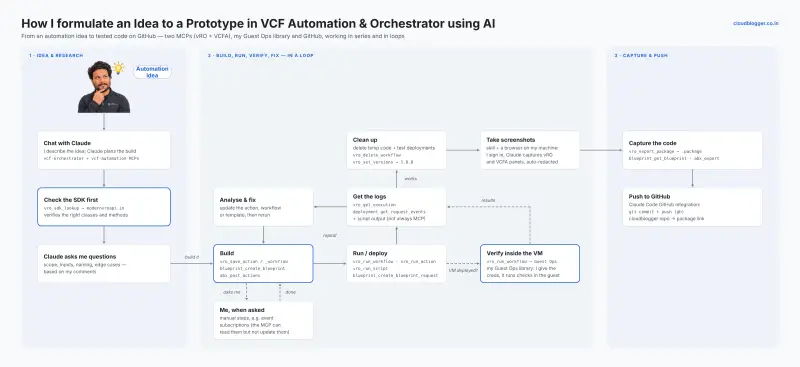
Claude Desktop now handles much of the work between an automation idea and a shareable prototype in VCF Operations Orchestrator and VCF Automation. The workflow builds actions, workflows and templates, runs them in a lab, checks results inside deployed virtual machines, then exports the code to GitHub. The operator still shapes the design, supplies credentials and approves what gets shared.
The setup was tested on VCF Operations Orchestrator 9.1.1 embedded in VCF Automation 9.1. It is for lab use only; the author says none of the workflow is used for production cases. That boundary matters: generated code can create, change or delete resources, so it needs testing in a safe environment before anyone considers using it elsewhere.

The tools and access boundaries
Claude Desktop hosts the long-running work sessions. The author reports that a Pro plan did not provide enough capacity for this workflow and currently uses Max, which has not been exhausted. Two MCP servers connect Claude to the VMware products: vcf-orchestrator-mcp handles Orchestrator workflows, actions, exports and SDK lookups; vcf-automation-mcp exposes VCF Automation REST operations for templates, ABX actions, deployments and events.
The API lookup depends on modernvroapi.in, which the Orchestrator MCP searches to confirm that a class or method exists. A Guest Ops library runs scripts inside deployed virtual machines, while GitHub receives the finished code through Claude’s GitHub integration. vRO Peekage gives readers a browser view of package contents without requiring an Orchestrator installation.
Claude has no direct connection to vCenter. All operations go through VCF Automation or Orchestrator, keeping them within those products’ role-based access controls and logs. When the workflow needs to find or configure a VM, or check its guest operating system, it does so through an Orchestrator workflow or script using the vCenter plug-in.
From idea to a tested build
The operator starts by describing the need in plain language. It might come from customer work or something encountered in the lab. Before writing code, Claude uses vro_sdk_lookup to check proposed Orchestrator classes and methods against the API reference. The author says this reduced errors caused by AI-generated code calling methods that do not exist in the target API.
Claude then asks about scope, inputs, naming and edge cases. Those answers settle the requirements before implementation begins. On the Orchestrator side, Claude uses vro_save_action and vro_save_workflow to create or update code, and vro_check_script to check scripts. For VCF Automation, it creates cloud template YAML with blueprint_create_blueprint and ABX actions with abx_post_actions.
The next step is to run the result. Claude can call vro_run_workflow, vro_run_action or vro_run_script for Orchestrator tests. For a template, it requests a deployment with blueprint_create_blueprint_request. A successful deployment is only the start of verification: a VM may be running while its hostname, time configuration or user setup is wrong.
To check what the guest actually sees, Claude runs the Guest Ops workflow through vro_run_workflow. The operator supplies guest credentials, and the workflow uses VMware Tools to run checks inside the VM’s operating system and return the results. That extends testing beyond whether the deployment completed successfully.
Claude reviews Orchestrator results with vro_get_execution, VCF Automation events with deployment_get_request_events, and the Guest Ops output. If a check fails, it updates the relevant action, workflow or template and runs the test again. The author usually watches this cycle rather than directing each operation. Once the build works, Claude removes temporary workflows, test deployments and scratch actions. Remaining items receive a version through vro_set_versions, starting at 1.0.0.
Export, documentation and human review
For Orchestrator, vro_export_package downloads the finished package as a .package file. For VCF Automation, Claude reads templates with blueprint_get_blueprint and exports ABX actions with abx_export. It commits and pushes the package to the author’s cloudblogger GitHub repository, then returns a link. Each shared package also gets a vRO Peekage link so readers can inspect its workflows, actions and scripts in a browser.
Screenshots are captured with a skill that opens a browser on the author’s machine. After the author signs in, Claude captures selected Orchestrator and VCF Automation panels and redacts lab hostnames automatically. Manual captures are still useful when a specific interface state is needed, such as a dialog open partway through a task, or when doing it directly is quicker.
Several decisions stay with the operator. Claude asks questions before building; the operator completes UI steps the MCPs cannot perform; guest credentials are supplied directly; and the operator reviews the final result before choosing what to publish. VCF Automation event subscriptions are one example of an incomplete MCP capability: the current server can read and delete them, but cannot create or update them.
Rules and known limitations
Claude follows project instructions stored as skills, which load when a task calls for them. The Orchestrator skill checks the server version, enforces naming conventions, versions finished items, requires testing and calls for cleanup. A separate skill standardizes screenshots. Keeping these rules in files means they apply across new chats and machines without requiring the operator to repeat them in each conversation.
The code rules are specific: Orchestrator JavaScript must use ES5.1, with no arrow functions, let, const or template literals. Names for workflows, actions, folders and modules must follow the author’s standard. Scratch actions are removed, and no item is left at version 0.0.0. The SDK is checked before a class or method is used.
Lab procedures add further limits. The server version is checked before recording the “Tested on” details, and shared code is tested in the form in which it will be published. Temporary test workflows stay in a separate lab folder and are deleted afterward. Test content does not go into customer projects, even within the lab. SecureString values are excluded from package exports, Claude does not enter passwords, and shared material contains no customer names or details. Claude Desktop’s tool approval prompts remain enabled for write and delete operations so the operator can review changes before they happen.
There are also technical quirks to account for. Execution logs do not always return reliably through the MCP, so test scripts collect output lines and return them as results. The ES5 check flags E4X XML literals, even though Orchestrator runs them; the author treats that warning as expected. The MCP also cannot pass composite-type workflow inputs, so test workflows seed those values in their first step.
What the next iteration may change
The author plans to add MCP support for creating and updating event subscriptions, make modernvroapi.in easier for AI agents to read, and improve capture of VCF Automation content so a post can package it alongside Orchestrator work. The current process already turns a lab prototype into an exported, inspectable package, but those changes would reduce the remaining manual work. Teams adapting the pattern should begin with the same practical controls: keep access inside the management layer, verify the guest state, and review each write or delete in a lab.
Tool links: vcf-orchestrator-mcp on GitHub and npm; vcf-automation-mcp on GitHub and npm; Orchestrator API reference; and vRO Peekage.


