VCF Automation 9 MCP Server Exposes 698 VM Apps Tools and 421 All Apps Tools
vcf-automation-mcp turns VCF Automation 9 APIs into AI tools, with separate org support, service account setup and read-only controls.
VCF Automation 9 can expose hundreds of its REST API operations to an AI assistant through one MCP server. The open-source vcf-automation-mcp package generates a tool for each operation in the API specs, with 698 tools for a VM Apps organization and 421 for an All Apps organization. That breadth gives administrators a chat interface to catalog requests, deployments, cloud templates, infrastructure and more, while making permissions and tool scope important setup decisions.
The server supports any AI client that can connect to MCP, including Claude Desktop, VS Code with GitHub Copilot and Cursor. It was tested with VCF Automation 9.1.1, vcf-automation-mcp 1.0.1 and Claude Desktop on Windows 11. The project is available on GitHub, and the package can be installed from npm.
API coverage depends on the organization type
VCF Automation 9 has two organization types with different API surfaces, so the server loads a matching tool set. A VM Apps org includes ABX, Identity, Onboarding and a broad IaaS API covering cloud accounts, zones, mappings, networks and machines. Its generated tools also cover approvals, deployment metrics, catalog, projects, custom forms, content gateway, Event Broker and the Orchestrator gateway.
An All Apps org has no ABX, Identity or Onboarding API. Its IaaS API is smaller, covering integrations, configuration properties, request tracking and certificates. Other infrastructure functions sit mainly in the org management API under /cloudapi, including regions, zones, namespaces, content libraries, VM classes, storage classes and infrastructure policies.
| Organization type | Generated tools | Notable services |
|---|---|---|
| VM Apps | 698 | ABX, Identity, Onboarding, IaaS, catalog, deployment, projects and Orchestrator gateway |
| All Apps | 421 | Org management, IaaS, catalog, deployment, projects and Orchestrator gateway |
Tool names follow a <service>_<operation> pattern. Examples include catalog_get_catalog_items, blueprint_create_blueprint and vro_run_workflow in both org types. VM Apps also has tools such as iaas_create_machine and abx_post_action_runs; All Apps has provider_query_regions. Each generated tool includes the API operation description, parameters and request body schema.
The tools come from the OpenAPI specs published by VCF Automation services under https://<vcfa>/tenant/<org>/api-docs. That means a new spec can be downloaded and used to regenerate the available tools, instead of maintaining each operation by hand. The server also translates OData parameters: clients pass names such as top, filter and select, and the server restores the $ prefix required by the API.
Two helper tools support administration. vcfa_connection_status reports the host, organization, org type, login status and number of loaded tools. Set test: true to make it log in and send a test request. vcfa_describe_operation returns a tool’s full request body schema, including deeply nested fields. Normal tool inputs stop at three levels to keep the list manageable, so the describe helper can be useful before a larger create or update request.
Set up one server entry per org
Each MCP server entry uses one organization, service account and login. To work with a VM Apps org and an All Apps org at the same time, configure two entries; the server keeps their sessions and tools separate. It selects the org type from VCFA_ORG_TYPE first, then from the type saved during setup, and defaults to vm-apps if neither is set.
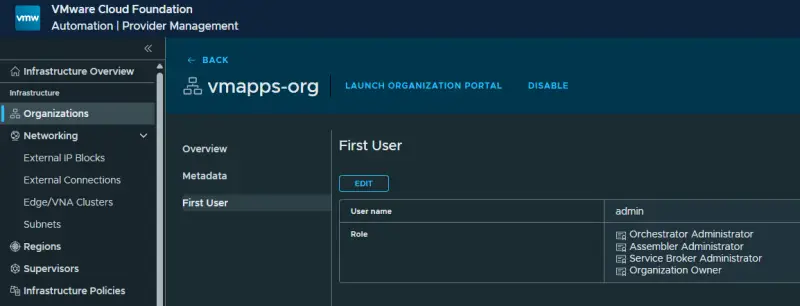
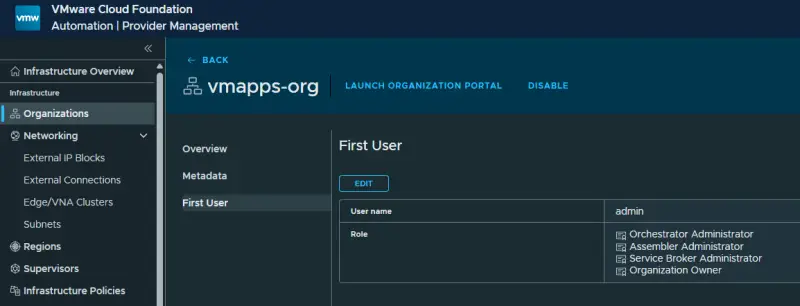
Before setup, the host machine needs access to VCF Automation 9.0 or later, Node.js 20.18 or newer with npm, and an organization that already exists. Use the exact organization name from the tenant URL, not its display name. Setup also requires a local org user with the needed administrative roles. The documented roles are Organization Administrator, Service Broker Administrator, Orchestrator Administrator and Assembler Administrator. Provider admin credentials aren’t intended for this setup.
The setup user’s roles determine what the resulting service account can do. Unless specific roles are supplied, setup copies the user’s roles except Auditor, Viewer and other read-only roles. Install the package globally:
npm install -g vcf-automation-mcpFor a VM Apps organization, a setup command looks like this:
vcf-automation-mcp setup --url https://auto.example.lab --org vmapps-org --user admin --name LAB-VCFA-VMApps-MCP --insecureFor an All Apps organization, specify its type:
vcf-automation-mcp setup --url https://auto.example.lab --org allapps-org-01 --org-type all-apps --user admin --name LAB-VCFA-AllApps-MCP --insecureThe password is entered at a masked prompt, used to sign in once and not saved. The --org value is the last part of https://<host>/tenant/<name>; --user is a local org username entered without @org. The --name value names the service account created during setup, which later appears under Access Control > Service Accounts. Use --role to specify a comma-separated role list. Add --insecure only when accepting a self-signed certificate; omit it when the certificate is trusted.
At the end, setup checks API access and prints the configuration block for the MCP client. A 403 response means the service account’s role does not cover that API. In the tested All Apps environment, checks for projects, RBAC auth context, IaaS integrations, catalog, deployment, blueprint, Event Broker, Orchestrator gateway, org management and regions returned HTTP 200.
Configure Claude Desktop and verify access
In the Claude Desktop version used in November 2026, MCP settings were available from the application menu under Settings, then Developer > Edit Config. The configuration file is %APPDATA%\Claude\claude_desktop_config.json on Windows and ~/Library/Application Support/Claude/claude_desktop_config.json on macOS. Paste in the block printed by setup. It contains no password or token.
For two organizations, the configuration has two entries under mcpServers, each with its own host, org name, org type and service list. For example, the VM Apps entry can use VCFA_ORG_TYPE: vm-apps and the All Apps entry VCFA_ORG_TYPE: all-apps. The sample configuration uses VCFA_INSECURE: true and different service lists for each org. Restart Claude Desktop completely after editing, including quitting it from the system tray. On Windows, if the app can’t find the command, run where.exe vcf-automation-mcp and use the returned full path as the configuration’s command.
After restart, check the client’s connectors list and confirm that both server entries appear. Selecting an entry shows its tools. If one is missing, inspect the MCP logs: they’re under %APPDATA%\Claude\logs on Windows and ~/Library/Logs/Claude on macOS, with filenames such as mcp-server-<name>.log.
Ask the assistant to run vcfa_connection_status with test set to true for the desired org. In the lab, the All Apps entry identified its type from VCFA_ORG_TYPE, logged in with the service account token and tested GET /rbac-service/api/auth-context, which returned HTTP 200. It loaded 410 of 421 tools because the configured service list was longer than the sample. The VM Apps check called GET /iaas/api/about and also returned HTTP 200.
Trim tool exposure and control writes
Loading hundreds of tools can slow some AI clients or exceed their tool limits. Set VCFA_SERVICES to load only selected services. For example, catalog,deployment,blueprint,project,abx,vro,eventbroker loads 184 of the 698 VM Apps tools. VCFA_EXCLUDE_SERVICES and VCFA_TOOL_FILTER, a regular expression matched against tool names, can narrow the list further. Run vcf-automation-mcp --list-services --org-type all-apps to see service names and tool counts.
To prevent changes, set VCFA_READ_ONLY to true. The server loads only GET tools and blocks write calls when invoked. That gives teams a view-only configuration for inspection. Without this setting, the assistant can create, update and delete content. The practical advice is to begin in a lab and keep the client’s tool approval prompts enabled so administrators can review changes before they run.
The server renews access tokens using the service account’s refresh token. Each renewal returns a new refresh token and invalidates the previous one, so the server saves the replacement to ~/.vcf-automation-mcp/tokens.json before continuing. The token file is separate from the one used by vcf-orchestrator-mcp, allowing both MCP servers to run at once, and it stores an entry for each org. Don’t copy the file to another machine; run setup there. To revoke access, delete the service account in VCF Automation.
Known API gaps and version details
The VCF Automation 9 Event Broker spec includes only two subscription operations: retrieve a subscription by ID and delete one. The interface can also list and create subscriptions, so the MCP package adds eventbroker_list_subscriptions and eventbroker_create_or_update_subscription through a small supplemental spec. They use the same endpoints as Aria Automation 8.x: GET and POST /event-broker/api/subscriptions. These operations aren’t in the published spec, so test them in a lab first.
There are two version-specific details to account for. In version 1.0.1, setup tested Event Broker using the subscription list endpoint. Version 1.0.2 changes that check to the documented GET /event-broker/api/topics endpoint. Also, All Apps IaaS operations require an apiVersion parameter; the tested environment used 2021-07-15. The tools mark it as required, allowing the assistant to include it.
Orchestrator access in an All Apps org depends on whether the service is enabled for that org. If it isn’t enabled, vro_* tools return 403 regardless of the service account’s roles, and the org administrator won’t see Orchestrator in the interface. The setup checks can help distinguish an org capability gap from a general login problem.
For administrators, the main decision is how much API access to expose to the assistant. Match the service account’s roles to the required tasks, trim the loaded tools with service filters, and enable read-only mode when changes aren’t needed. Then verify each org’s connection and API access before using the tools against production workloads. The project’s source, API specs and changelog are available on GitHub.


