Microsoft Fabric On-Demand Billing: Four Cost Scenarios and Admin Checks
Fabric on-demand billing can cut costs for some workloads, but multipliers, spend limits and the lack of smoothing make workload choice matter.
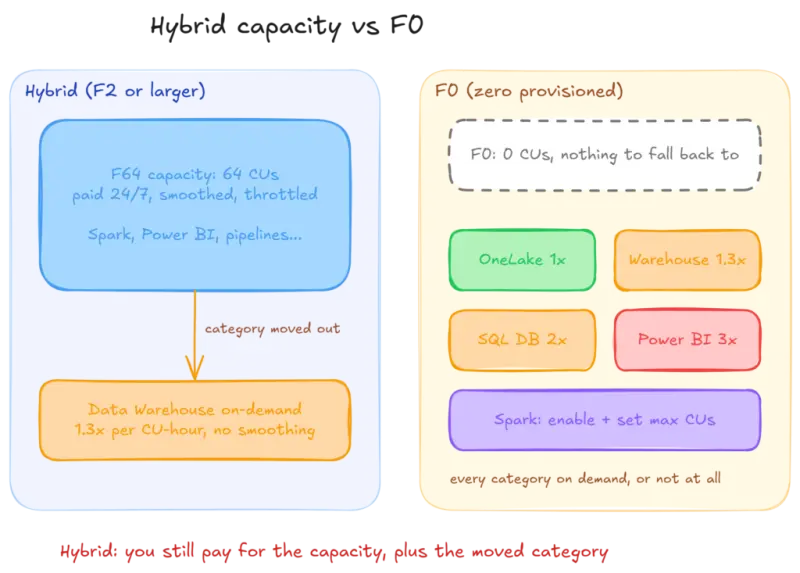
Fabric on-demand billing changes the capacity decision from “which SKU should we buy?” to “which workloads should leave the shared capacity, and what will their CU-hours cost?” Now in preview, it lets teams run supported workloads on an F0 capacity with zero provisioned CUs, or move selected workloads off an existing capacity and onto a separate Azure meter. That flexibility can help with intermittent use and sharp spikes. It can also make a low, steady workload more expensive if its category has a high multiplier.
The key operational difference is that on-demand usage has no smoothing. Each operation is billed as it runs, and a category’s spend limit rejects new operations only after its rolling 24-hour limit is reached. Running work continues. Teams evaluating the preview should model the workload by category, set limits before enabling it, and check the metering during use.
What moves off capacity
On-demand billing applies to a billing category, which maps to workloads rather than individual Fabric items. When a category is enabled, its consumption leaves the shared CU pool and is billed through its own meter. It can no longer be throttled by the capacity, and it won’t consume CUs that other workloads need.
There are two operating modes. In a hybrid capacity, such as F2 or larger, administrators can enable on-demand billing for selected categories while the rest continue using provisioned CUs. An F0 capacity has no provisioned CUs: each supported category either runs on demand or doesn’t run. There is no capacity to fall back to if a category is disabled.
In a hybrid setup, disabling a category returns it to the capacity. Setting its limit to zero while leaving it enabled blocks that category instead. Consumption already reported and smoothed on the capacity before a category is enabled remains on the capacity.
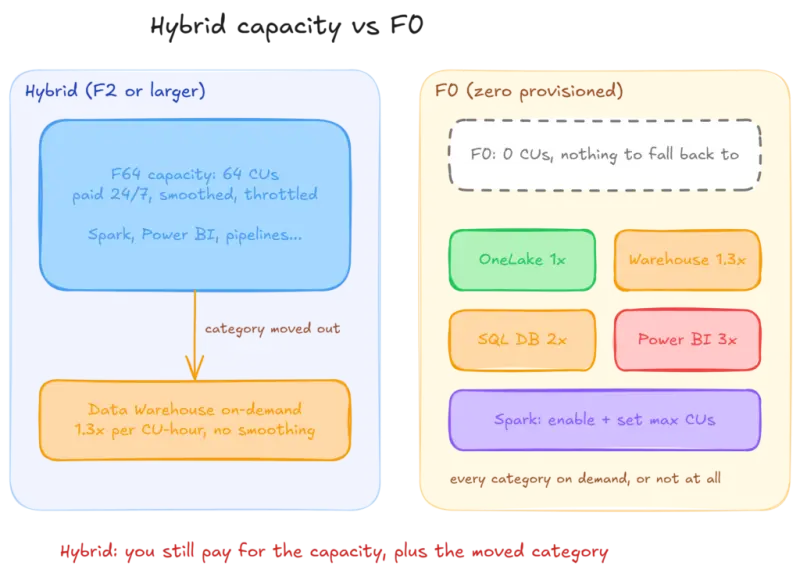
Data Warehouse includes warehouse queries, SQL analytics endpoint queries, snapshot queries and T-SQL notebooks. Power BI Semantic Models includes refreshes, queries, XMLA read and write, and web modeling. Fabric has 17 categories, including OneLake, Cosmos DB and Fabric IQ. Administrators enable them at capacity level. Data Warehouse also has workspace-level controls.
Three ways to pay beyond provisioned CUs
On-demand billing is distinct from capacity overage and Autoscale Billing for Spark. Capacity overage keeps work on the provisioned capacity: when smoothed usage would otherwise trigger throttling, the excess is billed at three times the pay-as-you-go rate. Autoscale Billing for Spark runs Spark jobs on separate serverless compute at pay-as-you-go rates; its model uses a shared capacity quota rather than a category spend limit. On F0, Spark requires explicit enablement and a maximum CU setting.
With on-demand billing, an entire category leaves the capacity and is charged per CU-hour at a category multiplier ranging from 1x to 3x. Overage bills only excess usage; on-demand bills all usage in the enabled category. That distinction matters when choosing between the options for a temporary spike.
How the meter and break-even math work
The regional pay-as-you-go price per CU-hour is the F2 hourly price divided by two. Matthew Farrow estimated the list price in North Europe at about $0.19 per CU-hour, which would put a 3x category at about $0.57. These are regional price examples, not universal rates. The multiplier changes the price, not the reported CU-hours: the same query reports the same consumption whichever billing method applies.

The category rates determine how quickly on-demand costs compare with a pay-as-you-go F2, which supplies 48 CU-hours per day. The break-even figures below divide 48 by each multiplier. Below the daily figure, on-demand costs less than an F2 on that basis; above it, the F2 costs less. A reserved F2 lowers the break-even consumption further.
| Category | Multiplier | F2 break-even (CU-hours per day) |
|---|---|---|
| OneLake, Copilot, Data agents, Mirroring | 1x | 48 |
| Dataflow Gen2 (in Data Factory) | 1.2x | 40 |
| Data Warehouse | 1.3x | 36.9 |
| Eventhouse | 1.36x | 35.3 |
| VNet data gateway, Apache Airflow jobs | 1.5x | 32 |
| SQL Database, Cosmos DB, User Data Functions, GraphQL | 2x | 24 |
| Power BI Semantic Models, Power BI Core Services, Eventstream, Activator | 3x | 16 |
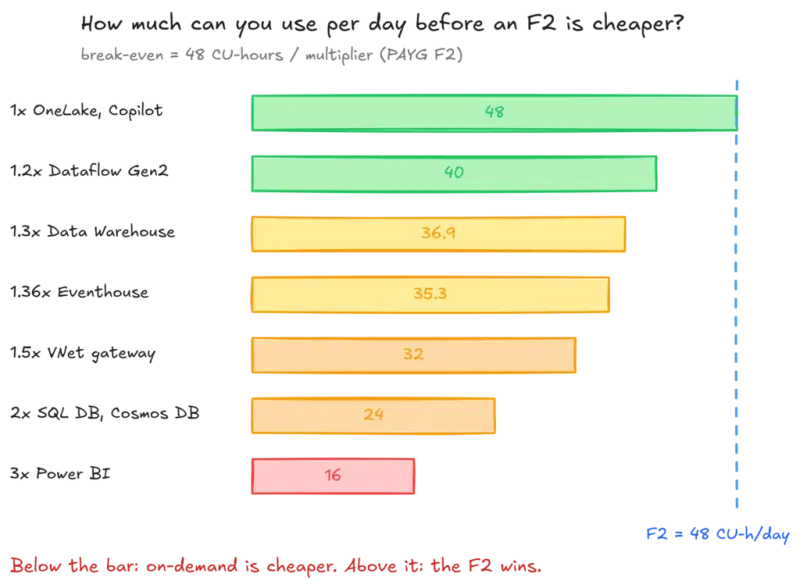
Check the meter for the specific operation, not just the category. Data Factory, for example, ranges from 1x for pipeline activities to 3x for Dataflow refresh. A category name alone may not be enough to estimate the bill.
No smoothing, and limits are not hard caps
Provisioned capacity smooths heavy refreshes and Spark jobs over 24 hours, which can let a smaller SKU absorb short bursts. On-demand billing doesn’t provide bursting or smoothing: usage is billed as it happens. The practical question for a spike becomes how many CU-hours it consumes, and at what multiplier.
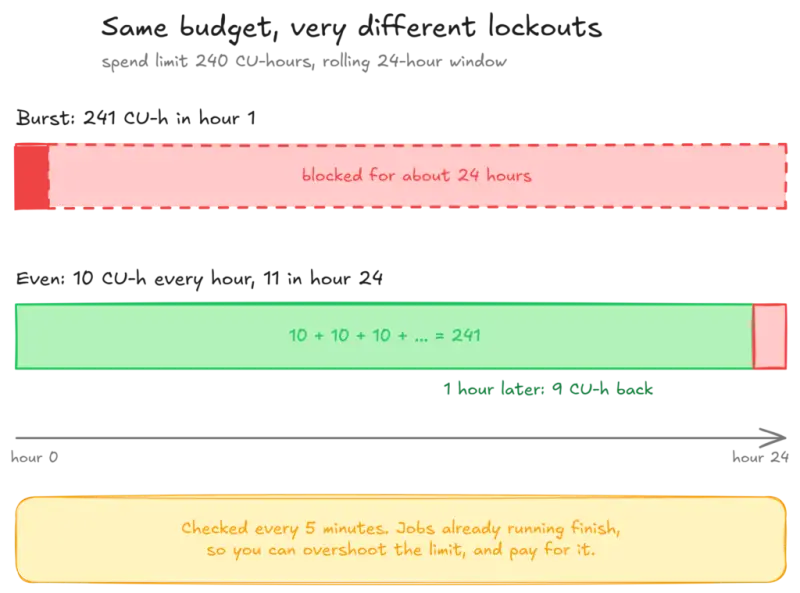
Each category has a spend limit in CU-hours over a rolling 24-hour window. Once the limit is reached, new operations are rejected, while operations already running are allowed to finish. The limit is checked every five minutes, so work started between checks can also run to completion. It is therefore a control on new work, not a hard ceiling on consumption or billing.
How long a category stays blocked depends on its usage pattern. A category that uses its full budget in an hour may have to wait nearly a day before enough old consumption leaves the window. Evenly spread usage returns some available budget each hour.
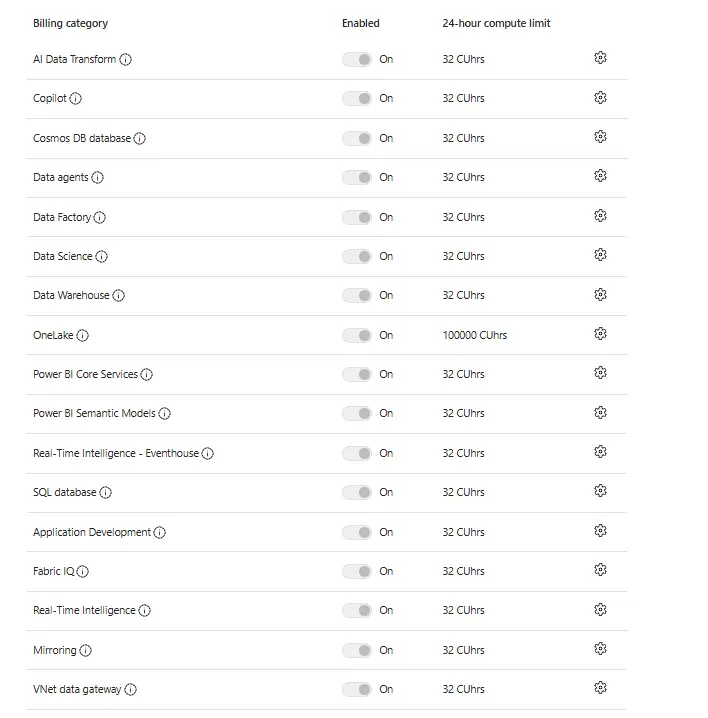
The default maximum spend limit is based on capacity quota in CUs multiplied by 24 hours, for each category on each capacity. A 16-CU quota gives each category a daily limit of 384 CU-hours. OneLake is an exception, with a 100,000 CU-hour daily quota.
In the Capacity settings shown for an F0 capacity in West Europe, each category had a 32 CU-hour limit, except OneLake at 100,000. Spark has a separate on-demand setting. Attempts to raise some workload quotas, including through the Azure portal, were unsuccessful in that region; the cause wasn’t confirmed.
Four workload scenarios
The following examples compare billed CU-hours, calculated as consumption multiplied by the category multiplier. They aren’t money estimates: multiply the result by the regional pay-as-you-go price per CU-hour. The daily totals also leave out timing effects from smoothing on provisioned capacity.
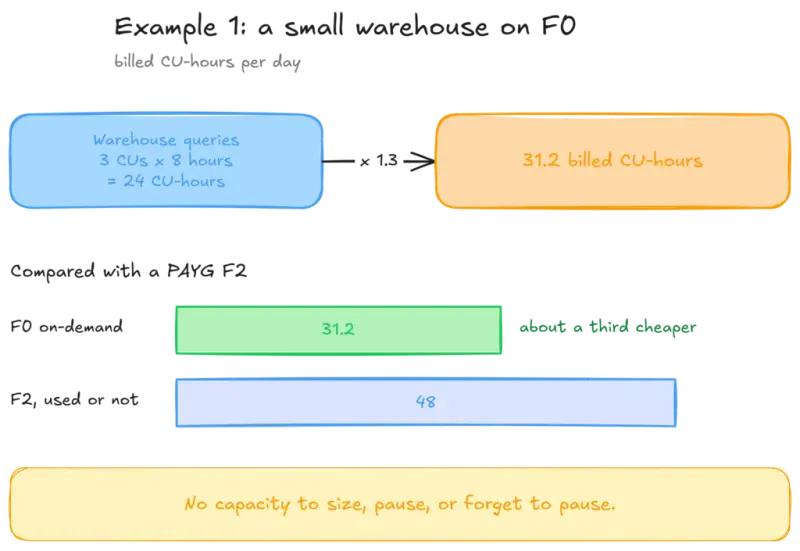
1. A small warehouse on F0
A warehouse averaging 3 CUs for eight business hours uses 24 CU-hours. At the Data Warehouse multiplier of 1.3x, that becomes 31.2 billed CU-hours per day. A pay-as-you-go F2 costs 48 CU-hours each day whether it is busy or idle, so this limited-hours workload costs less on demand in this comparison. F0 also removes the need to size or pause a provisioned capacity.
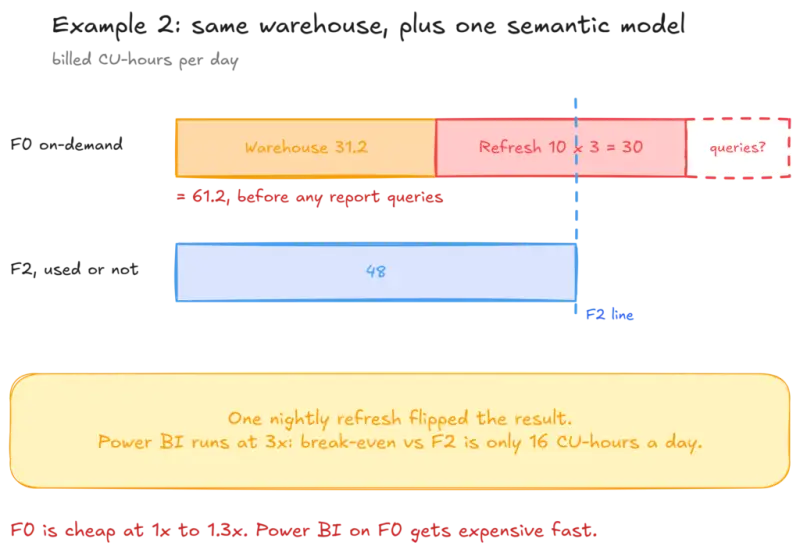
2. Add a semantic model refresh
Add an Import semantic model with a nightly refresh consuming 10 CU-hours. At the 3x Power BI multiplier, that refresh adds 30 billed CU-hours. The warehouse and refresh now total 61.2 billed CU-hours per day, before counting report queries. The F2 comparison has flipped: the refresh alone takes this combination past the 48 CU-hour daily reference, and report activity adds further consumption.
This is why F0 can suit workloads at 1x to 1.3x while Power BI usage needs closer scrutiny. Its break-even against the F2 reference is 16 CU-hours per day.
3. Move a warehouse during a promotion on F64
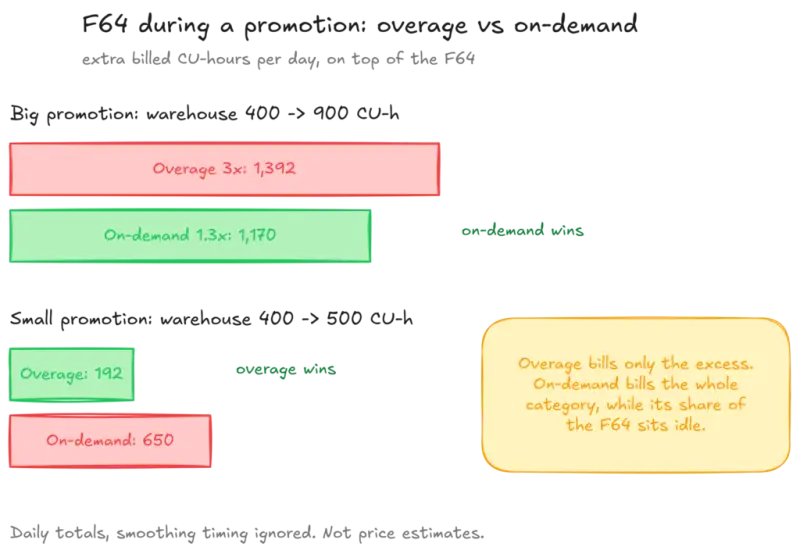
Consider an F64 with 1,536 CU-hours available per day. In the example, the warehouse normally uses 400, while other workloads use 1,100. During a promotion, warehouse usage rises. The comparison shows why moving a full category can be worthwhile for a large spike but costly for a small one.
- Capacity overage at 3x: At 900 warehouse CU-hours, total usage is 2,000; the 464 CU-hours above capacity become 1,392 billed CU-hours. At 500 warehouse CU-hours, total usage is 1,600; the 64-CU-hour excess becomes 192 billed CU-hours.
- Data Warehouse on demand at 1.3x: At 900 CU-hours, the whole category costs 1,170 billed CU-hours. At 500, it costs 650.
On-demand has the lower billed total for the larger promotion in this calculation, but the higher total for the smaller one. The F64 is still being paid for in both cases, and the 400 CU-hours the warehouse previously used on it sit unused when the category moves. Overage charges only the excess.
4. A query that runs at the workspace ceiling
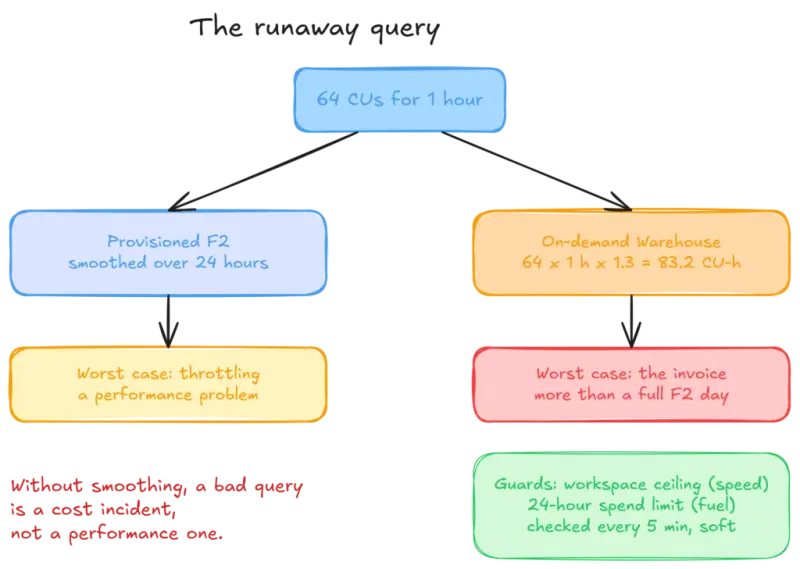
A new warehouse workspace starts with a default compute ceiling of 64 CUs. If a query holds the warehouse at that level for one hour, the calculation is 64 × 1 × 1.3, or 83.2 billed CU-hours. That exceeds a full day of pay-as-you-go F2 usage in one hour. On provisioned F2, the same work would be smoothed and could contribute to throttling; on demand, it creates an immediate bill.
Two settings help control this risk: the workspace compute ceiling, with a minimum of 25 CUs, and the category’s 24-hour spend limit. When migrating a capacity that used bursting, Fabric sets default ceilings based on the prior burst level: 620 CUs for F64 and 51 CUs for F2 or F4. Administrators should check those ceilings against their budgets.
Neither setting stops an operation already running from completing after the spend limit is reached. Query acceleration adds another cost consideration: it can use roughly up to seven times more compute, and all queries go through the acceleration meter when it is enabled, including queries that aren’t accelerated.
F0 limits and preview gaps
Microsoft’s published guidance describes F0 as a zero-CU capacity. A disabled category has nowhere to fall back to, and dependencies between workloads mean disabling OneLake can affect reads and writes elsewhere. Spark requires on-demand billing to be enabled separately and a maximum CU value to be set. That maximum is tied to the subscription’s regional capacity quota, not to a SKU size.
Workspace monitoring isn’t supported for workspaces on F0. Pausing an F0 capacity stops its categories from accepting requests. By default, a subscription and region can have 20 on-demand-enabled capacities, counting F0 and hybrid capacities together. Upgrading F0 to a paid SKU disables on-demand billing for all categories; the subscription must have enough regular capacity quota for the target SKU, because on-demand quota doesn’t count. VNet data gateways don’t yet enforce the 24-hour on-demand limit. The documented workaround is to run the gateway on F2 or larger.
There’s also an information gap around engine limits. Fabric SKU limits normally derive from CU count and include semantic model maximum memory, memory per query, DirectQuery parallelism and Spark vCores per CU. The on-demand documentation doesn’t publish F0 values for these limits. Informal comments at FabCon Barcelona suggested F0 limits may be around F2 level, but that isn’t documented; teams shouldn’t treat it as a planning guarantee. Spark is a special case: an F0 may run larger Spark jobs than an F2 if regional quota allows.
Where administrators should start
F0 looks most promising for evaluation, development and small projects built mainly around Warehouse, OneLake, pipelines and AI functions in the 1x to 1.3x range. Hybrid on-demand can also suit a workload that spikes hard enough to disrupt other capacity users, with Data Warehouse offering workspace ceilings as an extra control. F0 may appeal for Spark experiments where the available quota supports more compute than a small SKU would provide.
Take extra care with Power BI workloads on F0, small spikes moved wholesale off a hybrid capacity, and steady workloads that run around the clock. A reservation or provisioned capacity can be less costly when use is constant. For production, set a spend limit for each enabled category from the start; without smoothing, an expensive query becomes a cost issue as well as a workload issue.
During the preview, review the On-demand compute page in the Capacity Metrics app weekly. For Data Warehouse, spend and ceiling alerts aren’t available in the preview. Before enabling a category, compare its operation-level multiplier and expected consumption with the cost of the capacity CUs it would otherwise use.
Microsoft’s setup, metering, quota and workload guidance is available in its Fabric on-demand billing documentation, setup instructions, meter and multiplier reference, and quota guidance. Related references cover Data Warehouse billing, capacity overage and capacity throttling and smoothing.


