Microsoft 365 Copilot Cost Management API: Reporting, Policies and Gaps
The public preview API exposes tenant and user credit balances and spending controls, but delegate permissions, multi step setup and UI gaps limit automation.
Microsoft’s public preview Copilot cost management API gives Microsoft 365 administrators endpoints for checking credit consumption, managing spending policies and configuring email alerts. The practical value is real, especially for teams that want to collect user level usage over time. But this is an early Graph API experience: many operations require several calls, most methods support delegate permissions only, and some settings don’t line up with the Microsoft 365 admin center.
Scope and limitations
The endpoints cover information and controls found under Copilot > Cost Management in the Microsoft 365 admin center. A tenant must have a supported usage based billing method configured: a PAYG subscription linked to Azure, Copilot Capacity Packs, the Copilot Credit Pre-purchase Plan, or a combination of these. Services and agents that don’t use usage based billing are outside the API’s scope.
The API doesn’t configure those billing methods. For example, administrators can’t use it to link an Azure subscription, and it doesn’t return actual prices. Its data is measured in Copilot credits, so teams that need to understand costs in currency will have to do additional work outside these endpoints.
There are also differences between the API and the admin center. Some settings available in the interface aren’t exposed through the API, and policies created through the API may not display correctly in the interface. In some cases, administrators may be unable to modify or delete those policies there. Treat API created policies with care until the two management paths behave consistently.
Permissions and roles
Delegate permissions are required for nearly all operations. The exception is getTenantCreditBalance, which also supports application permissions. That distinction matters for unattended reporting: application permissions can be used for tenant balances, but per user reporting and policy management still require a delegated context.
The API permissions listed for these operations are:
- CopilotCostManagement.Read.All to retrieve the tenant credit balance.
- CopilotCostManagement-Policy.Read.All and CopilotCostManagement-Policy.ReadWrite.All to read, create, update and delete policies, along with their service settings and alerts.
- CopilotCostManagement-Assignment.Read.All and CopilotCostManagement-Assignment.ReadWrite.All to read, add and remove a policy’s group audience.
- CopilotCostManagement-UserData.Read.All to retrieve per user details.
Directory roles also depend on the task. Creating spending policies requires the Billing administrator role; AI administrator and License administrator roles are listed for policy management. The examples below used Global administrator, so the exact experience with narrower roles may differ. In Graph Explorer, these permissions weren’t available in the consent control at the time of writing. Administrators who use that tool need to add them through another method; guidance for managing delegated permissions is available here.
Reading tenant and user balances
For a tenant’s current credit balance, send a GET request to the beta endpoint:
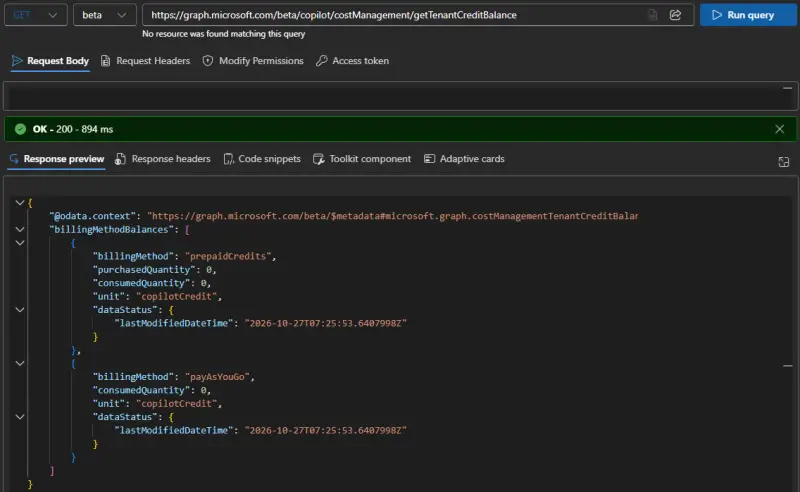
GET https://graph.microsoft.com/beta/copilot/costManagement/getTenantCreditBalance
The response reports credits consumed, grouped by configured billing method. It’s a snapshot for the request date, indicated by the dataStatus field, rather than a historical record. Depending on the billing methods configured, the response may also include purchasedQuantity and remainingQuantity. Microsoft describes the returned balance structure in its costManagementBillingMethodBalance documentation.

Per user balances use a separate endpoint. The identifier in the URL must be the user’s GUID; a UPN isn’t accepted. There’s no list method, either, so collecting data for multiple people means making a separate request for each user. The call requires CopilotCostManagement-UserData.Read.All, with delegate permissions only.
GET https://graph.microsoft.com/beta/copilot/costManagement/userBalances/xxxxxxxx-xxxx-xxxx-xxxx-xxxxxxxxxxxx?$expand=*
Use $expand to request service details with the balance, or make a separate call to /serviceBalances. The service level data includes credits consumed, configured limits and remaining amounts. The related response structure is described in Microsoft’s costManagementUserServiceBalance documentation.

The per user response offers useful detail, but it doesn’t supply historical usage or convert credits into money. Administrators can periodically query and store results to build a record of tenant and individual consumption. That approach also creates work: teams must handle the repeated requests and maintain their own history, cost calculations and any forecasting they need.
Creating and assigning spending policies
Policies can apply limits across the tenant through the global All Users Policy, or target particular services and groups. Before creating one, plan its audience: the audience can’t be changed after creation. Group assignments can be added later, but a group scoped policy remains disabled until it has at least one group assigned and the policy is enabled.

Policy creation requires the CopilotCostManagement-Policy.ReadWrite.All delegated permission and the Billing administrator or Global administrator role. Adding or managing group assignments also requires CopilotCostManagement-Assignment.ReadWrite.All.
A policy request must include its @odata.type, which identifies whether it applies to all users or selected groups. The displayName must contain at least 10 characters and can’t include special characters. Two required properties set the limits: periodLimit defines the policy limit, while perUserLimit sets the limit for each user. The request also needs serviceSettings to identify the covered services. Billing methods and email alert settings are optional. For a group scoped policy, the groups can be included through assignedGroups or added after creation. Microsoft documents the spendingPolicy resource and serviceSettings resource.
This example creates a selected groups policy for the cowork service with a period limit of 22,222 credits and a per user limit of 2,222 credits. A successful request returns 201 Created, but the policy starts disabled and has no groups assigned.
POST https://graph.microsoft.com/beta/copilot/costManagement/spendingPolicies
{
  "@odata.type": "#microsoft.graph.selectedGroupsSpendingPolicy",
  "displayName": "Test policy",
  "billingMethods": "payAsYouGo",
  "periodLimit": {
    "@odata.type": "#microsoft.graph.limitedCostManagementQuantity",
    "unit": "copilotCredit",
    "value": 22222
  },
  "perUserLimit": {
    "@odata.type": "#microsoft.graph.limitedCostManagementQuantity",
    "unit": "copilotCredit",
    "value": 2222
  },
  "serviceSettings": [
    {
      "serviceId": "cowork",
      "state": "enabled"
    }
  ]
}
Add a group through the selected groups policy’s assignedGroups/$ref endpoint. This operation needs the assignment write permission and an If-Match header containing the current ETag.
POST https://graph.microsoft.com/beta/copilot/costManagement/spendingPolicies/{id}/microsoft.graph.selectedGroupsSpendingPolicy/assignedGroups/$ref
Content-Type: application/json
If-Match: "{current-etag}"
{
  "@odata.id": "https://graph.microsoft.com/beta/groups/{group-id}"
}

Updating and deleting policies
Updates and deletes require the policy’s current ETag in the If-Match header. The ETag is separate from the policy ID. Retrieve the current value from @odata.etag in a GET response or from the response’s etag header. After a successful PATCH, which returns 200 OK, the ETag changes; use the new value for the next update or delete.
PATCH https://graph.microsoft.com/beta/copilot/costManagement/spendingPolicies/{id}
Content-Type: application/json
If-Match: "{current-etag}"
{
  "displayName": "Pilot teams monthly cap"
}
Deleting a policy uses the same endpoint family and also requires the current ETag:
DELETE https://graph.microsoft.com/beta/copilot/costManagement/spendingPolicies/{id}
If-Match: "{current-etag}"

Setting up email alerts
Alerts are optional and can notify individual people in the organization by email when consumption reaches a specified credit value or percentage of a limit. Groups, including mail enabled groups, and external addresses aren’t supported. Alerts are informational: they don’t change access to a service.
Alert configuration is available only after policy creation. The setup is unusual because a newly created policy has no emailThresholdSettings object: a GET can return 404 Not Found, and there’s no POST method to create it. Instead, start with an empty PATCH to instantiate the object, add a recipient through its recipients/$ref endpoint, then PATCH again to enable the alert and set thresholds. Each step requires the latest ETag. Microsoft describes the emailThresholdSettings resource and alert threshold resource.
PATCH https://graph.microsoft.com/beta/copilot/costManagement/spendingPolicies/{id}/emailThresholdSettings
If-Match: "{current-etag}"

POST https://graph.microsoft.com/beta/copilot/costManagement/spendingPolicies/{id}/emailThresholdSettings/recipients/$ref
If-Match: "{current-etag}"
{
  "@odata.id": "https://graph.microsoft.com/beta/users/{user-id}"
}

PATCH https://graph.microsoft.com/beta/copilot/costManagement/spendingPolicies/{id}/emailThresholdSettings
If-Match: "{current-etag}"
{
  "isEnabled": true,
  "thresholds": [
    {
      "@odata.type": "#microsoft.graph.absoluteCostManagementAlertThreshold",
      "value": 44444,
      "unit": "copilotCredit"
    }
  ]
}
The API doesn’t expose the admin center’s setting for alerting when a user reaches a monthly spending amount. That’s one of several gaps administrators should account for when deciding whether to manage policies through Graph or the interface.
What administrators should check
Tenant wide policies are simpler to create because they don’t need group assignments. Their required type is #microsoft.graph.allUsersSpendingPolicy. Other interface settings are missing from the API, including Allow new Agents and services as they become available. Policy deletion also has a reported compatibility problem: an API created policy may fail to delete through the interface, which can return the message, “Not Supported – Spending policies cannot be deleted through the legacy configuration-plan DELETE operation.”
There are smaller friction points, too. The serviceSettings and emailThresholdSettings relationships aren’t returned through $select or $expand, so retrieving a full policy configuration can take extra calls. Per user collection likewise requires one request per user, and policy changes depend on keeping ETags current.
For now, the API is most useful for carefully scoped reporting and straightforward policy management by an administrator who can handle delegated access and multiple requests. Teams building a usage history should store snapshots themselves and account for the fact that credit balances don’t represent currency costs. Before rolling out policies, verify the audience, service settings, limits and alerts through the methods available in the tenant; the API’s beta status and its differences from the admin center make that check part of the configuration work.


