Microsoft 365 Outage Phishing Targets Users With Fake Message Recovery Alerts
Emails mimicking Microsoft 365 service notices sought credentials after a November outage. Teams should review exposure and prioritize phishing-resistant MFA.
The practical lesson from the November 2026 Microsoft 365 disruption is that a believable service problem can make a fraudulent sign-in request feel routine. Within a day of the outage, attackers were sending messages that claimed held email would soon be deleted and offered a way to restore it. Microsoft described the activity as likely credential phishing; it did not report evidence that users had submitted credentials or that accounts were compromised.
How the outage became a phishing lure
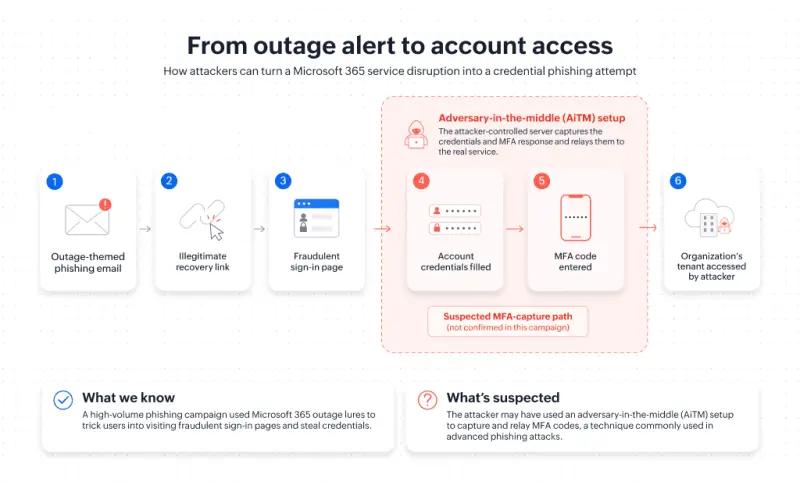
The service disruption affected Exchange Online and Outlook on November 12, 2026. On November 13, attackers began circulating messages styled as Microsoft 365 service-health notices. They referenced familiar services, including Microsoft Teams, SharePoint Online and Microsoft 365 Copilot, to make the emails fit the recipients’ working environment.
Some messages said that four emails had been held during the disruption and would be deleted within 24 hours. A “RESTORE MESSAGES” button directed recipients toward an external website designed to resemble a Microsoft sign-in page. The urgency and the suggested recovery task aligned with what employees might expect after delayed or unavailable email.
Microsoft Threat Intelligence described the activity in a report published November 16, 2026. Its findings included suspicious sender domains, subject lines varied around the outage theme and links tailored to individual recipients. The messages also contained what looked like an email conversation, a design that may help them appear familiar and could complicate filtering.
Microsoft’s report says Microsoft Defender policies blocked or quarantined detected messages in environments where the activity was active. That response can reduce exposure, but it doesn’t establish whether someone clicked a link or entered credentials. Teams should treat filtering results as one part of the investigation, alongside user and sign-in activity.
Why MFA methods differ under phishing pressure
Multi-factor authentication adds a verification step beyond a password, but the method matters. A one-time code that a user types into a web page can still be captured by a fraudulent sign-in site. In an adversary-in-the-middle attack, an attacker may relay the sign-in exchange to the real service and obtain a session token. That can let the attacker use the authenticated session without repeating the sign-in process.
The weakness is that a password or manually entered code doesn’t, by itself, confirm that the page belongs to the intended service. An employee can believe they are signing in to Microsoft 365 while supplying credentials to a lookalike site. Security awareness and email filtering help limit the chances of that interaction, but they depend on the user recognizing the deception or the message being caught.
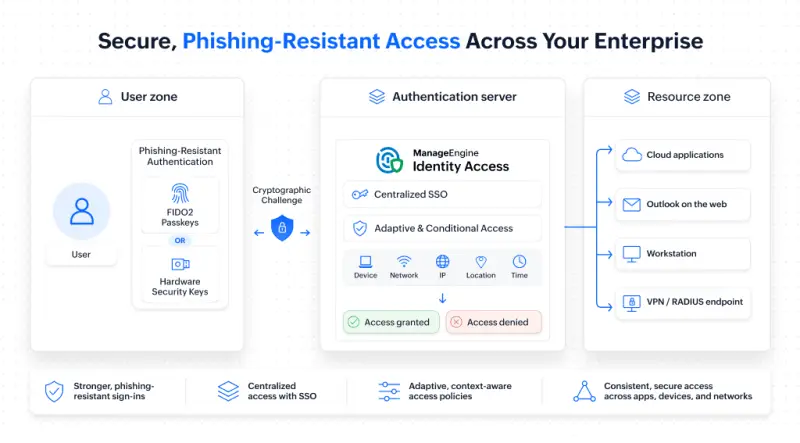
Microsoft recommends prioritizing phishing-resistant methods such as passkeys and security keys. FIDO2 authentication uses public-key cryptography: the user’s authenticator protects a private key, while the service holds the corresponding public key. During sign-in, the authenticator produces a cryptographic response that the service can verify. The credential is tied to the service’s identity, so a site using a different domain cannot obtain a valid response for the legitimate service.
This changes the role of the user in the security process. They still need to respond appropriately to unexpected messages, but a moment of misplaced trust is less likely to hand an attacker a reusable code or valid authentication response. The protection is especially relevant for accounts that can reach sensitive business data, administrative functions or critical systems.
Actions for security and identity teams
Microsoft’s findings give security teams a starting point for checking whether the outage themed messages reached their users. Teams can review the indicators and hunting queries in Microsoft’s report, search for related messages and identify users who followed links. Where the investigation suggests possible credential exposure, review sign-in records, active sessions, authentication registrations, mailbox forwarding rules and unusual application permissions.
For identity teams, the incident is a reason to assess where SMS codes and other manually entered one-time passwords remain in use. Moving to FIDO2 passkeys or hardware security keys can reduce the risk that a fake sign-in page will capture an authentication response. A staged rollout can begin with privileged accounts and applications containing sensitive information, then expand to other supported access points.
That work should cover the organization’s access paths, not only Microsoft 365. Employees may use cloud applications, VPNs, on-premises systems and managed devices, each with its own sign-in experience and controls. Consistent authentication requirements across those services can make it easier to apply phishing-resistant methods where they matter most.
Contextual controls can add another layer. Adaptive MFA and conditional access policies can use factors such as device, network, IP address, time and location to determine what authentication or access restrictions apply. Centralized single sign-on can help administrators manage access policies across supported services. These controls need to reflect the organization’s environment and the access each account requires.
The outage did not create the underlying weakness in phishable authentication, but it gave attackers a timely and plausible explanation for an urgent request. Security teams should use incidents like this to check whether detection, account investigation and authentication controls work together. The most useful next step is to identify exposed sign-in paths and prioritize phishing-resistant authentication for the accounts with the greatest access.


